One-sentence summary: LoRA trains a low-rank decomposition of the weight update instead of all weights; QLoRA quantizes the frozen base model to 4-bit so you can run the same trick on an RTX 3090.
26.1 Why Efficient Fine-Tuning Exists
26.1.1 The full fine-tuning math
Suppose you want to fine-tune LLaMA-7B into a specialized code-review assistant. The naive approach---full parameter fine-tuning---updates all 7 billion weights.
Here is what that actually costs in GPU memory:
- Model weights (fp16): 7B × 2 bytes = 14 GB
- Gradients (same size as weights): 14 GB
- Optimizer state (Adam stores two moments per parameter): 28 GB
That is 56 GB for these three tensors alone, before activations, temporary buffers, allocator overhead, or fp32 master weights. A full run therefore needs substantially more than this lower bound; the exact GPU requirement depends on sequence length, batch size, checkpointing, and implementation.
26.1.2 The storage problem
Every fine-tuned variant produces a full copy of the weights:
- Code-review assistant: 14 GB
- Security-audit assistant: 14 GB
- Documentation assistant: 14 GB
Three variants, 42 GB. A team running 20 downstream applications holds 280 GB of nearly identical parameter files. You can see the absurdity.
26.1.3 The key insight
The LoRA paper motivates a low-rank hypothesis for the useful weight change ΔW in several adaptation settings. It is an approximation and an empirical design choice, not a theorem that every fine-tuning update is low-rank.
If ΔW is inherently low-rank, you do not need to parameterize it with a full N×D matrix. You can approximate it with two small matrices whose product has that rank. That observation is LoRA.
26.2 LoRA Core Idea: Low-Rank Decomposition
26.2.1 The math
Any matrix can be approximated as the product of two smaller matrices:
ΔW (N × D) ≈ B (N × r) @ A (r × D)where r is the rank and r ≪ min(N, D).
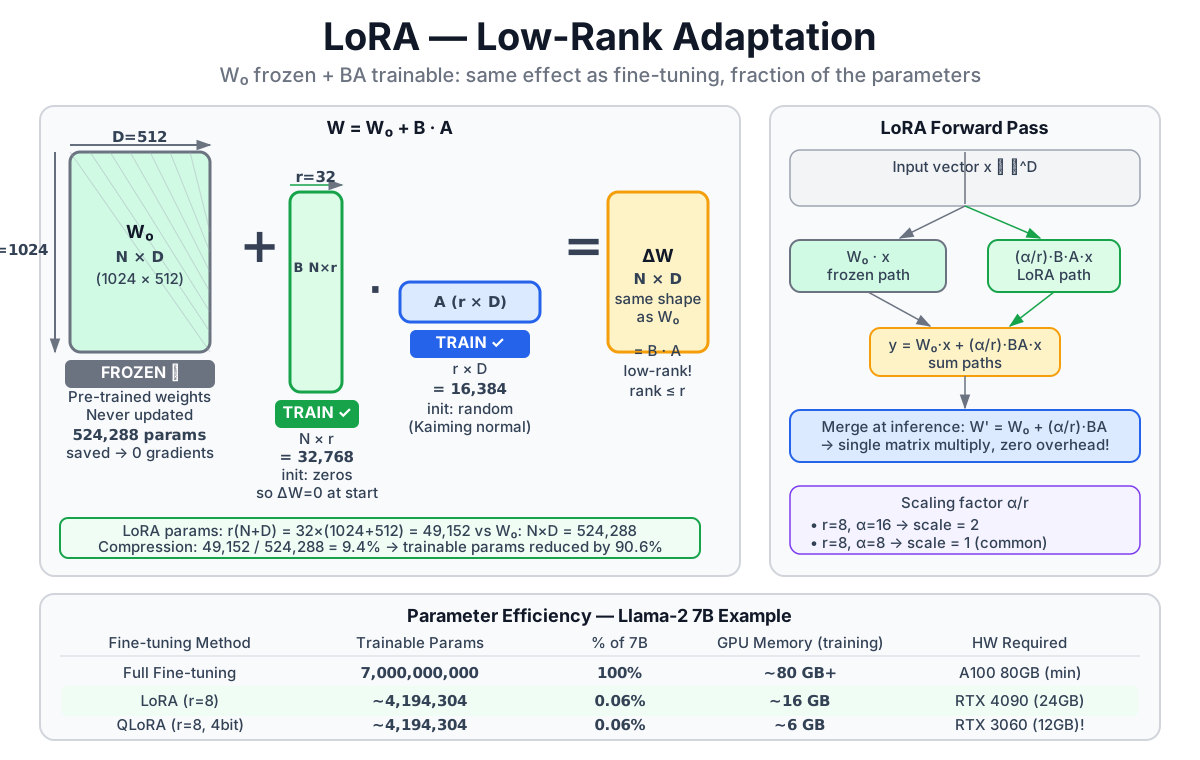
Parameter count comparison for N=1024, D=512, r=32:
- Original: 1024 × 512 = 524,288
- Low-rank: 32 × (1024 + 512) = 49,152 (about 9.4%)
26.2.2 The LoRA training setup
LoRA does not modify the pretrained weight W. It freezes W and learns the update separately:
W_new = W_original + B @ ADuring training:
- W_original is frozen---no gradients, no optimizer state
- Only B and A are updated
During inference (when the adapter is merged):
- Merge once:
W_merged = W_original + (α/r) × B @ A - Use W_merged exactly like the original model
- Zero inference overhead after merging
26.2.3 Initialization strategy
Matrix B: initialized to zero
B = zeros(N, r)Matrix A: initialized randomly (Kaiming)
A = randn(r, D) * sqrt(2 / D)At the start of training, B @ A = zeros @ randn = 0, so W_new = W_original. The model starts from an exact copy of the pretrained model. No training shock, no instability. This is a carefully designed property.
26.2.4 The scaling factor alpha
The complete forward pass with LoRA:
y = W @ x + (α/r) × B @ (A @ x)The α/r term keeps learning dynamics stable across different rank choices. As r grows, the product B @ A naturally grows in magnitude; α/r counterbalances this. In practice:
- Set α = r for a neutral scale (α/r = 1)
- Set α = 2r for stronger LoRA contribution
- HuggingFace PEFT defaults to α = 8
26.3 Choosing Rank
26.3.1 What rank controls
Rank r determines how many "degrees of freedom" the update has:
- r = 1-4: very few trainable parameters, suitable for simple style or format adaptation
- r = 8-16: the community sweet spot for most instruction-following fine-tunes
- r = 32-64: more capacity for complex domain adaptation
- r > 64: rarely needed; may overfit on small datasets
26.3.2 Empirical data: rank vs. quality
The original LoRA paper reports this on a text generation benchmark (val_loss and downstream metrics):
| Rank r | val_loss | BLEU | NIST | METEOR | ROUGE-L | CIDEr |
|---|---|---|---|---|---|---|
| 1 | 1.23 | 68.72 | 8.7215 | 0.4565 | 0.7052 | 2.4329 |
| 2 | 1.21 | 69.17 | 8.7413 | 0.4590 | 0.7052 | 2.4639 |
| 4 | 1.18 | 70.38 | 8.8439 | 0.4689 | 0.7186 | 2.5349 |
| 8 | 1.17 | 69.57 | 8.7457 | 0.4636 | 0.7196 | 2.5196 |
| 16 | 1.16 | 69.61 | 8.7483 | 0.4629 | 0.7177 | 2.4985 |
| 32 | 1.16 | 69.33 | 8.7736 | 0.4642 | 0.7105 | 2.5255 |
| 64 | 1.16 | 69.24 | 8.7174 | 0.4651 | 0.7180 | 2.5070 |
| 128 | 1.16 | 68.73 | 8.6718 | 0.4628 | 0.7127 | 2.5030 |
| 256 | 1.16 | 68.92 | 8.6982 | 0.4629 | 0.7128 | 2.5012 |
| 512 | 1.16 | 68.78 | 8.6857 | 0.4637 | 0.7128 | 2.5025 |
| 1024 | 1.17 | 69.37 | 8.7495 | 0.4659 | 0.7149 | 2.5090 |
Three things to notice:
- r=4 wins on several generation metrics. Bigger is not always better.
- val_loss stops improving after r=16.
- r=512 performs no better than r=4 on generation quality while training much slower.
26.3.3 Practical rank selection
| Task | Recommended rank | Reasoning |
|---|---|---|
| Simple instruction following | 4-8 | Task is low-complexity |
| Summarization, translation | 8-16 | Moderate adaptation needed |
| Code generation, complex reasoning | 16-64 | Higher capacity required |
| Not sure | 8 | Safe default, matches community practice |
The rule I use: start at r=8. If the eval metric plateaus too early or never converges, try r=16. I have rarely needed to go above r=64 for practical fine-tunes.
26.4 Where to Apply LoRA
26.4.1 Attention projections
The original LoRA paper applies adapters to the Q, K, V, and output projections of each Attention layer:
# For each Attention layer, add LoRA to Q, K, V projections:

lora_query_B = nn.Parameter(torch.zeros(d, r))
lora_query_A = nn.Parameter(torch.randn(r, d))

lora_key_B   = nn.Parameter(torch.zeros(d, r))
lora_key_A   = nn.Parameter(torch.randn(r, d))

lora_value_B = nn.Parameter(torch.zeros(d, r))
lora_value_A = nn.Parameter(torch.randn(r, d))

# effective updates:
lora_Wq = lora_query_B @ lora_query_A
lora_Wk = lora_key_B   @ lora_key_A
lora_Wv = lora_value_B @ lora_value_A
26.4.2 Target modules by model family
| Model | Common LoRA targets |
|---|---|
| LLaMA / Mistral | q_proj, k_proj, v_proj, o_proj, gate_proj, up_proj, down_proj |
| GPT-2 | c_attn, c_proj, c_fc |
| BERT | query, key, value, dense |
Conservative starting point: only Q and V projections. Works well for most tasks. Recommended extension: add output projection and K. Marginal cost, often better results. Aggressive option: include all FFN linear layers. Maximum capacity, higher risk of overfitting on small data.
HuggingFace PEFT configuration:
from peft import LoraConfig, TaskType

lora_config = LoraConfig(
    r=8,
    lora_alpha=16,
    target_modules=[
        "q_proj", "k_proj", "v_proj", "o_proj",
        "gate_proj", "up_proj", "down_proj"
    ],
    lora_dropout=0.05,
    bias="none",
    task_type=TaskType.CAUSAL_LM,
)
26.4.3 Trainable parameter fraction
For a typical 7B LLaMA-style model, the fraction depends on the target modules and rank. With r=8 on the seven projection names above, it is on the order of 0.1% or less, not a universal 5%:
- Frozen (base model): roughly 7B parameters, no gradients
- Trainable (LoRA): configuration-dependent, typically a few million parameters at this rank
That is what moves the memory requirement from 56 GB to something manageable.
26.5 Full LoRA Code
26.5.1 LoRA fine-tuning
from transformers import AutoModelForCausalLM, AutoTokenizer
from peft import LoraConfig, get_peft_model, TaskType
import torch

# 1. Load base model
model_name = "meta-llama/Llama-2-7b-hf"
model = AutoModelForCausalLM.from_pretrained(
    model_name,
    torch_dtype=torch.float16,
    device_map="auto"
)
tokenizer = AutoTokenizer.from_pretrained(model_name)

# 2. Configure LoRA
lora_config = LoraConfig(
    r=8,
    lora_alpha=16,
    target_modules=["q_proj", "k_proj", "v_proj", "o_proj",
                    "gate_proj", "up_proj", "down_proj"],
    lora_dropout=0.05,
    bias="none",
    task_type=TaskType.CAUSAL_LM
)

# 3. Apply LoRA
model = get_peft_model(model, lora_config)

# 4. Inspect parameter count
model.print_trainable_parameters()
# trainable params: 4,194,304 || all params: 6,742,609,920 || trainable%: 0.06%
26.5.2 Training loop
from transformers import TrainingArguments, Trainer

training_args = TrainingArguments(
    output_dir="./lora-output",
    num_train_epochs=3,
    per_device_train_batch_size=4,
    gradient_accumulation_steps=4,
    learning_rate=2e-4,
    fp16=True,
    save_steps=100,
    logging_steps=10,
)

trainer = Trainer(
    model=model,
    args=training_args,
    train_dataset=train_dataset,
    tokenizer=tokenizer,
)

trainer.train()

# Save only the adapter weights (tens of MB, not 14 GB)
model.save_pretrained("./lora-weights")
26.5.3 Loading and merging
from peft import PeftModel

base_model = AutoModelForCausalLM.from_pretrained(
    "meta-llama/Llama-2-7b-hf",
    torch_dtype=torch.float16,
    device_map="auto"
)

# Load adapter on top of base
model = PeftModel.from_pretrained(base_model, "./lora-weights")

# Merge adapter into base weights for zero-overhead inference
model = model.merge_and_unload()
26.6 QLoRA: Fine-Tuning on Consumer Hardware
26.6.1 The remaining bottleneck
LoRA cuts trainable parameters to ~0.1%. But the frozen base model still sits in GPU memory. A 7B model in fp16 needs 14 GB, and that is before the LoRA adapter or any optimizer state.
For an RTX 3090 with 24 GB, 14 GB just for the base leaves little headroom. For anything larger---13B, 70B---it is simply impossible.
QLoRA's answer: quantize the frozen base model to 4-bit, then apply LoRA adapters at full precision.
QLoRA = frozen base (4-bit int4) + trainable adapters (bf16/fp32)26.6.2 Memory comparison
| Method | 7B memory | Practical GPU |
|---|---|---|
| Full fine-tuning (fp16) | 80 GB+ | A100 80GB |
| LoRA (fp16 base) | 16-20 GB | A100 40GB, RTX 4090 |
| QLoRA (4-bit base) | base-weight lower bound around 4 GB; total is workload-dependent | RTX 3090/4080 can work for suitable batch and context settings |
This is the number that matters for most practitioners. QLoRA put serious fine-tuning within reach of a single 24 GB GPU.
26.6.3 The three QLoRA innovations
The original QLoRA paper (Dettmers et al., 2023) introduced:
1. NF4 (NormalFloat4): a 4-bit data type designed for the specific distribution of neural network weights. Standard int4 assumes uniform distribution. NF4 spaces the 16 quantization levels to minimize expected error under a normal distribution, matching what weight matrices actually look like.
2. Double quantization: quantize the quantization constants themselves. Each block of 64 weights shares a scale factor (a float32). NF4 is stored as int4 (0.5 bytes per weight) but the scale factor costs extra. Double quantization compresses scale factors to 8-bit, saving about 0.37 bits per weight on average.
3. Paged optimizers: optimizer states (Adam's first and second moments) can overflow GPU memory during long sequences. QLoRA uses NVIDIA unified memory to page those states to CPU RAM automatically rather than crashing.
26.6.4 QLoRA code
from transformers import AutoModelForCausalLM, AutoTokenizer, BitsAndBytesConfig
from peft import LoraConfig, get_peft_model, prepare_model_for_kbit_training
import torch

# 1. Configure 4-bit quantization
bnb_config = BitsAndBytesConfig(
    load_in_4bit=True,
    bnb_4bit_quant_type="nf4",              # NormalFloat4
    bnb_4bit_compute_dtype=torch.float16,   # compute in fp16 for speed
    bnb_4bit_use_double_quant=True,         # double quantization
)

# 2. Load quantized base model
model = AutoModelForCausalLM.from_pretrained(
    "meta-llama/Llama-2-7b-hf",
    quantization_config=bnb_config,
    device_map="auto"
)

# 3. Prepare for k-bit training (casts layer norms, enables gradient checkpointing)
model = prepare_model_for_kbit_training(model)

# 4. Apply LoRA adapters at full precision
lora_config = LoraConfig(
    r=8,
    lora_alpha=16,
    target_modules=["q_proj", "k_proj", "v_proj", "o_proj"],
    lora_dropout=0.05,
    bias="none",
    task_type="CAUSAL_LM"
)

model = get_peft_model(model, lora_config)

# Training proceeds identically to plain LoRA
26.7 LoRA vs Full Fine-Tuning
26.7.1 Quality comparison
| Metric | Full fine-tuning | LoRA (r=8) | LoRA (r=16) |
|---|---|---|---|
| Task quality | baseline for this experiment | must be measured on the task | must be measured on the task |
| Trainable parameters | 100% | ~0.1% | ~0.2% |
| GPU memory | very high | low | low |
| Training time | slow | fast | fast |
There is no universal percentage gap: results depend on data, target modules, rank, optimizer, and evaluation set. Compare against a full-fine-tuning baseline when that decision matters.
26.7.2 When to use which
Use LoRA / QLoRA when:
- Consumer or mid-tier GPUs (24 GB, 40 GB)
- Rapid iteration across hyperparameter configurations
- Multiple downstream variants sharing one base model
- Task similarity to the pretrained distribution is reasonable
Consider full fine-tuning when:
- Target domain diverges strongly from pretraining (very specialized vocabulary, radically different format)
- You have abundant A100 or H100 GPU time
- Final production quality justifies the cost, and the few percent gap matters
26.7.3 The adapter ecosystem advantage
With LoRA, one base model hosts many adapters. Switch between a code-review adapter, a documentation adapter, and a security-audit adapter at runtime by swapping a few hundred MB of adapter weights. The 14 GB base stays loaded. This is the architecture pattern that makes multi-tenant fine-tuning economically practical.
26.8 Common Questions and Best Practices
26.8.1 How do I pick rank?
Start at r=8. If val loss plateaus too early, try r=16 or r=32. I have almost never needed more than r=64 in practice.
26.8.2 How do I set alpha?
- α = r is the neutral choice
- α = 2r gives LoRA more influence over the frozen weights
- Default values from PEFT are fine for most tasks
26.8.3 Which modules should I target?
Conservative: Q and V only. Recommended: Q, K, V, and output projection. Aggressive: all linear layers including FFN.
26.8.4 LoRA or QLoRA by GPU size
| GPU (VRAM) | Model | Recommendation |
|---|---|---|
| RTX 3090 / 4090 (24 GB) | 7B | QLoRA |
| RTX 3090 / 4090 (24 GB) | 13B | QLoRA |
| A100 (40 GB) | 7B | LoRA |
| A100 (40 GB) | 13B | QLoRA |
| A100 (80 GB) | 7B-13B | LoRA |
| A100 (80 GB) | 70B | QLoRA |
26.8.5 Training is unstable. What now?
In order of things to try first:
- Lower learning rate (2e-4 → 1e-4)
- Add warmup steps
- Reduce batch size and increase gradient accumulation to compensate
- Audit data quality---noisy labels destabilize LoRA faster than full fine-tuning because the adapter has less capacity to average them away
26.9 Chapter Summary
26.9.1 Key concepts
| Concept | Description | Key formula |
|---|---|---|
| LoRA | Low-Rank Adaptation; trains only update | W = W_orig + (α/r) × B @ A |
| Rank (r) | Capacity of the adapter; controls parameter count | r in range 4-64 |
| Alpha (α) | Scale factor; keeps learning dynamics consistent | typically r or 2r |
| QLoRA | 4-bit base + full-precision LoRA adapters | 6-8 GB for a 7B model |
26.9.2 Parameter count formula
For a weight matrix of dimension N × D:
- Original: N × D parameters
- LoRA adapter: N × r + r × D = r × (N + D) parameters
- Compression ratio: r × (N + D) / (N × D)
For N=1024, D=512, r=8: adapter holds 1.5% of original parameter count.
26.9.3 Initialization recap
- B matrix: zero-initialized so the adapter starts as a no-op
- A matrix: random-initialized so gradients flow from step one
- Result: training begins from an exact copy of the pretrained model
26.9.4 Core takeaway
LoRA is built on one empirical observation: fine-tuning weight changes are low-rank. Training two small matrices B and A instead of the full ΔW preserves 95%+ of the quality at 0.1% of the parameter update cost. QLoRA extends this to consumer hardware by storing the frozen base at 4-bit. Together they democratized serious fine-tuning beyond the data-center tier.
Chapter Checklist
After this chapter, you should be able to:
- Explain why full fine-tuning of a 7B model requires 56 GB+ of GPU memory.
- Describe the LoRA weight formula and explain why B is zero-initialized.
- Explain what rank controls and recommend a starting value for a new task.
- Name the three innovations in QLoRA (NF4, double quantization, paged optimizers).
- Write a minimal PEFT LoRA and QLoRA setup using HuggingFace libraries.
- Choose LoRA vs QLoRA based on available GPU memory and model size.
See You in the Next Chapter
That covers how to adapt a large model without retraining all of it.
The next question is simpler to state and harder to implement: how do you run the model cheaply after training? Chapter 27 covers GPTQ, AWQ, and GGUF---the quantization formats that determine whether a model fits on your GPU, your laptop, or your cloud bill.