In one sentence: A KV Cache stores past Keys and Values in every layer. Decode still computes a new Q, K, and V for the new token, but it no longer recomputes old K/V.
22.1 Where Is the Repeated Work?
The teaching generator in Chapter 20 sends its trailing window through the model again at every step. Its output is valid, but it repeatedly computes hidden states and K/V for old tokens.
Suppose a nyckelharpa maker writes the following notes. The bracketed chunks are teaching units, not claims about a real tokenizer:
Prompt: [the] [nyckelharpa]

step 1: [the] [nyckelharpa]                         → [has]
step 2: [the] [nyckelharpa] [has]                   → [sixteen]
step 3: [the] [nyckelharpa] [has] [sixteen]         → [sympathetic]
step 4: [the] [nyckelharpa] [has] [sixteen]
        [sympathetic]                                → [strings]
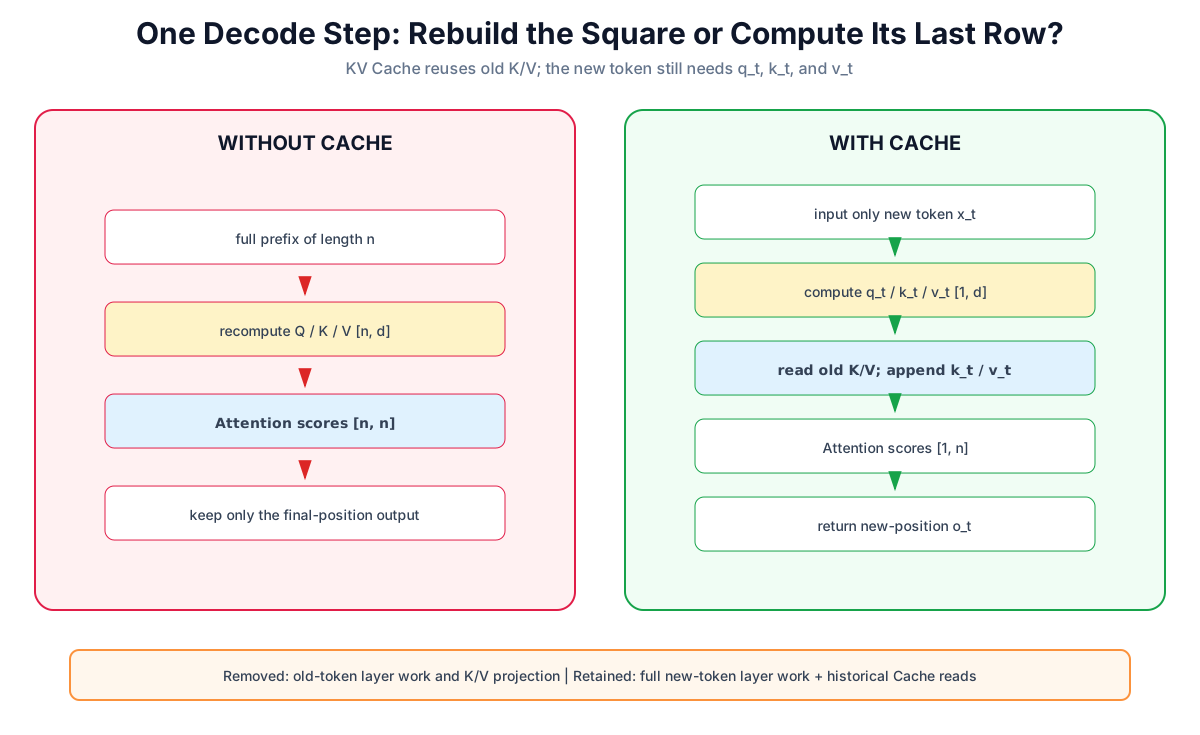
Without a cache, step 4 runs every older chunk through every layer again. In a causal model, however, old positions cannot see future tokens. If the weights, prefix, and positions have not changed, the K/V produced at those old positions do not change either.
That is the reusable work.
Boundary from Chapter 20: its fixed sinusoidal positions restart at zero after cropping to a new window. Once that window slides, retained tokens receive different positions, so their hidden states and K/V are no longer the old values. Matching that teaching implementation exactly requires rebuilding the shifted window; a production sliding-window Cache needs a position and cache policy supported by the model.
22.2 What Is Cached, and What Is Still Computed?
For one Attention module in layer :
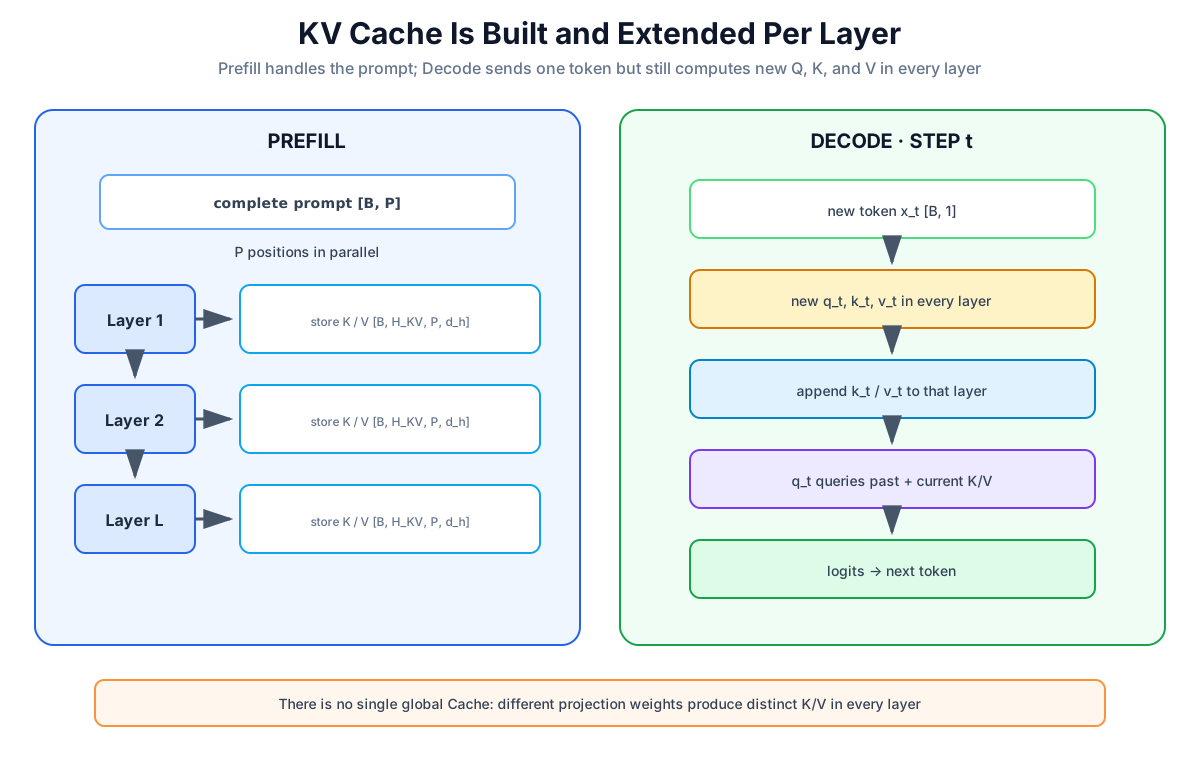
Prefill processes the whole prompt once and creates, in every layer:
At Decode position , that layer still projects the new hidden state into:
It appends the new K/V:
Then it computes only the new Query row:
Why Not Cache Old Queries?
Outputs for old positions have already been consumed; future steps never need to recompute those old Attention rows. A new position needs one new Query. That Query must still match against every historical Key and retrieve from every historical Value, so past K/V remain useful.
Boundary: Encoder–Decoder models may also cache Encoder K/V used by Decoder cross-attention. This chapter focuses on Decoder-only causal self-attention; “KV Cache exists only in decoders” is not a universal architecture law.
22.3 Complexity: Name the Work Being Counted
Let the current context length be . Looking only at the Attention scores and Value weighting in one layer:
| Current Decode step | Without cache | With cache |
|---|---|---|
| Query–Key pairs | ||
| Leading Attention work | ||
| Old-token K/V projections | recomputed | reused |
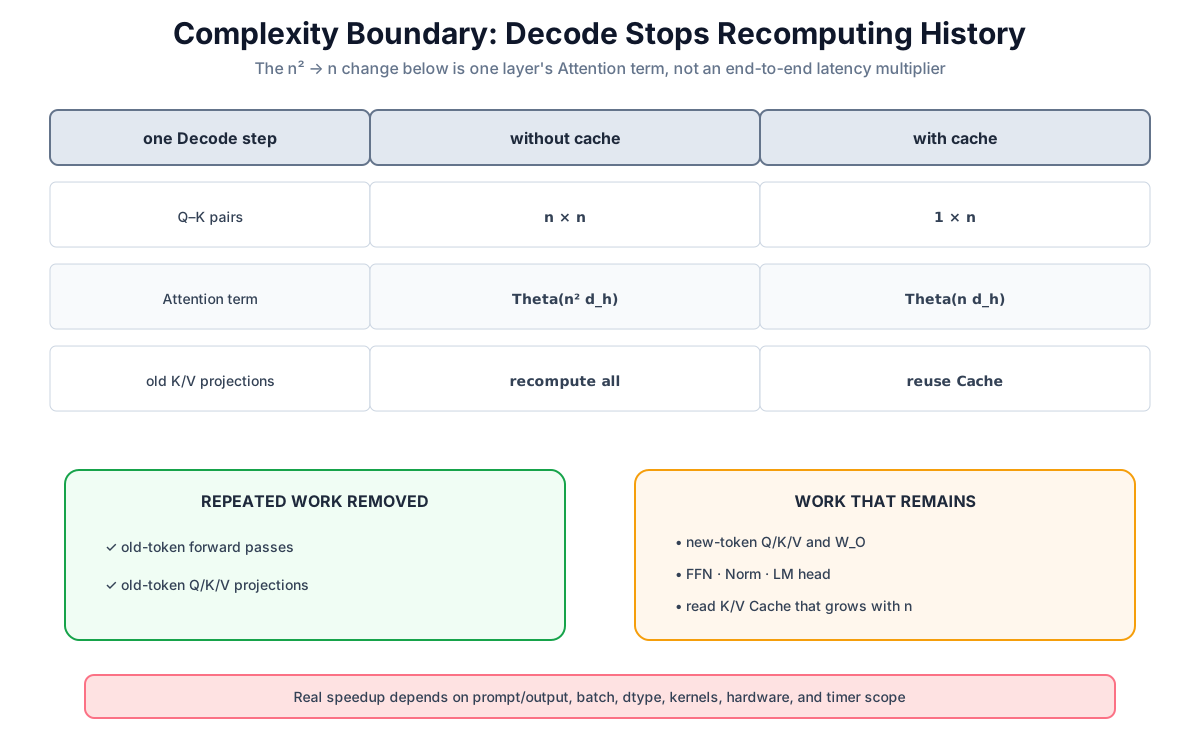
Before a fixed context window saturates, if generation grows from a short prefix to length , summing only this Attention work gives the familiar shorthand:
That is not “the whole model is always N times faster.” Every step still runs the new token through every layer's Q/K/V projection, output projection, FFN, Norm, and LM head, and it reads an ever-growing Cache from memory. End-to-end speedup depends on prompt/output length, batch, model, dtype, kernels, hardware, and what the timer includes. An old 11-second-versus-56-second run is not a portable guarantee.
22.4 Memory: n_kv_heads Is the Important Dimension
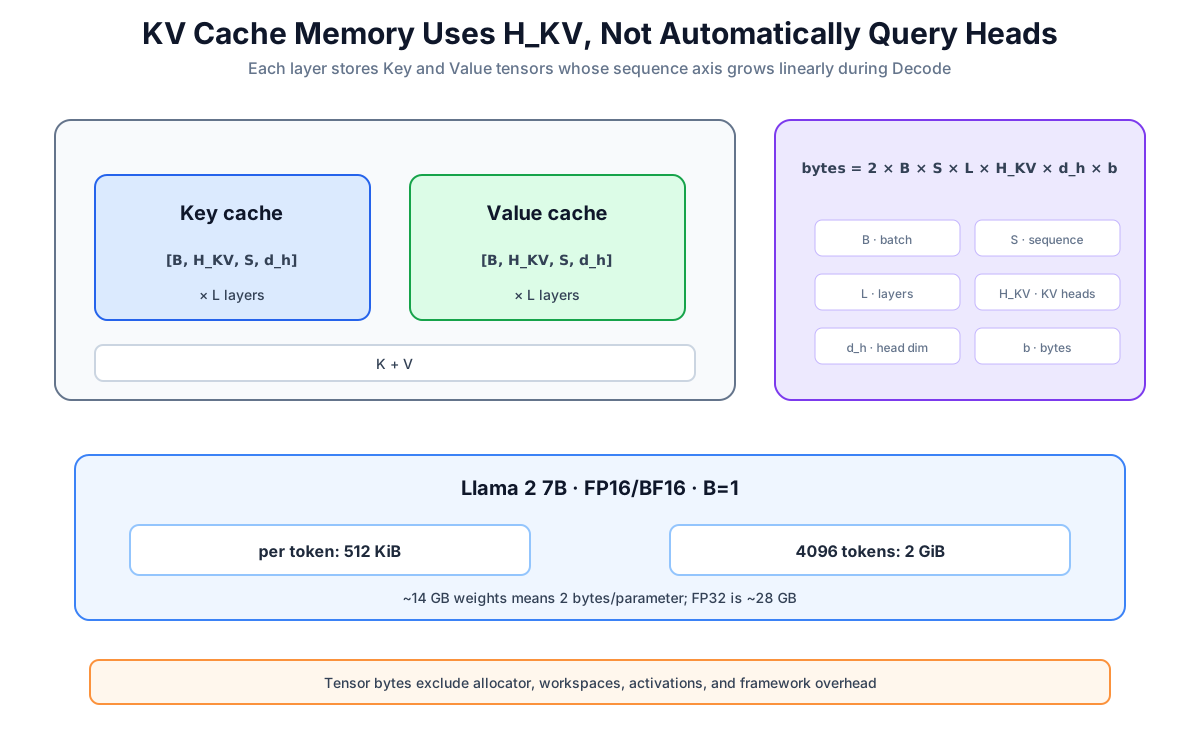
For a conventional dense Cache, the theoretical tensor bytes are:
- : one Key and one Value;
- : batch size (beam expansion can also affect the real Cache);
- : cached sequence length;
- : layer count;
- : number of KV heads, not necessarily Query heads;
- : head dimension;
- : bytes per element.
Worked Example: Llama 2 7B
Llama 2 7B has 32 layers, 32 KV heads, and head dimension 128. At 2 bytes for FP16/BF16, batch 1, and 4,096 tokens:
per token = 2 × 32 × 32 × 128 × 2
          = 524,288 bytes = 512 KiB

4096 tokens = 2,147,483,648 bytes = 2 GiB
This also fixes a common unit slip: roughly 14 GB of 7B weights at 2 bytes per parameter is an FP16/BF16 scale. FP32 is roughly 28 GB, before runtime overhead.
An NVIDIA A10 has 24 GB of GDDR6. Even if a rough budget subtracts about 14 GB of weights, the remainder is not entirely available to KV: the framework, allocator, temporary workspaces, activations, and other buffers need memory. Saying “10 GB ÷ 2 GiB equals exactly five 4K requests” also mixes GB and GiB. Even after normalizing units, it is only an overhead-free paper calculation, not a deployment promise.
For this exact MHA configuration, pure Cache arithmetic extrapolates to 16 GiB at 32K and 64 GiB at 128K. That arithmetic does not give the original 4K model valid 128K positional behavior or quality.
22.5 Prefill and Decode Are Different Workloads
| Phase | Prefill | Decode |
|---|---|---|
| Input | complete prompt | one or a few new tokens |
| Cache | write the prompt K/V in every layer | append new K/V in every layer |
| Parallelism | prompt positions can run in parallel | output tokens are sequential |
| Common metric | TTFT, time to first token | TPOT, time per output token |
| Common bottleneck | long prompts are often compute-heavy | small batches are often bandwidth/latency-heavy |
“Often” is deliberate. Short prompts, large batches, quantization, and different kernels move the boundary. FlashAttention reduces I/O within one Attention evaluation; KV Cache avoids recomputing historical K/V across Decode steps. They solve different layers of the problem.
22.6 Multi-Turn Reuse Is Conditional
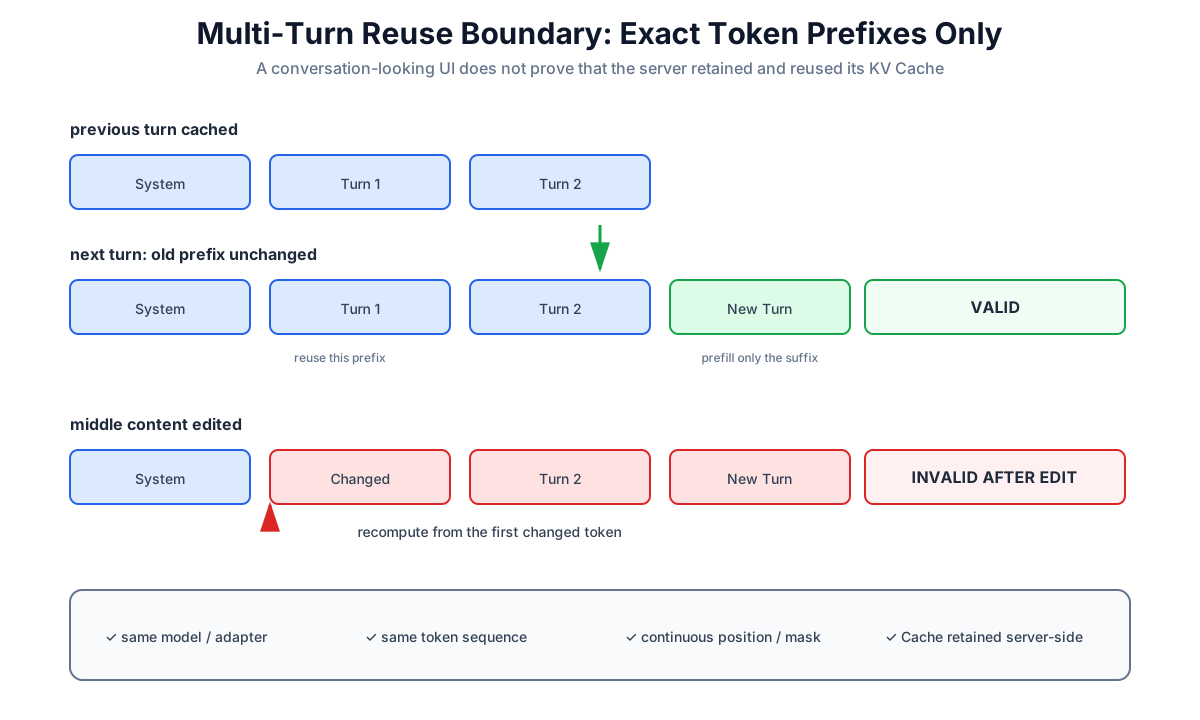
Reuse across turns requires all of the following:
- the previous Cache still exists in the same server-side session;
- the new token sequence begins with the exact same token prefix;
- the attention mask and position IDs /
cache_positioncontinue correctly; - the model, adapter, and Attention-affecting configuration are unchanged.
Change the system prompt, chat template, history, or a token in the middle, and the Cache after the first change is invalid. Many APIs are stateless and prefill the submitted history again. A UI that looks like one conversation does not prove server-side KV reuse.
The streaming “typewriter effect” is not created by the Cache alone. Autoregressive models already produce tokens sequentially, and the server must stream them to the client. KV Cache merely removes much of the repeated work behind each step.
22.7 An Executable Equivalence Check
This one-layer teaching implementation omits bias, , and positional encoding. It checks only the core cache recurrence by comparing full causal Attention with token-by-token cached decoding. It is not a production kernel, but its equivalence assertion actually runs.
import math
import torch


def split_heads(x, n_heads):
    batch, time, width = x.shape
    if width % n_heads != 0:
        raise ValueError("width must be divisible by n_heads")
    head_dim = width // n_heads
    return x.view(batch, time, n_heads, head_dim).transpose(1, 2)


def merge_heads(x):
    batch, n_heads, time, head_dim = x.shape
    return x.transpose(1, 2).contiguous().view(
        batch, time, n_heads * head_dim
    )


def project(x, w_q, w_k, w_v, n_heads):
    return (
        split_heads(x @ w_q, n_heads),
        split_heads(x @ w_k, n_heads),
        split_heads(x @ w_v, n_heads),
    )


def full_causal_attention(x, w_q, w_k, w_v, n_heads):
    q, k, v = project(x, w_q, w_k, w_v, n_heads)
    scores = q @ k.transpose(-2, -1) / math.sqrt(q.size(-1))
    time = x.size(1)
    future = torch.triu(
        torch.ones(time, time, dtype=torch.bool, device=x.device),
        diagonal=1,
    )
    scores = scores.masked_fill(future, -torch.inf)
    return merge_heads(torch.softmax(scores, dim=-1) @ v)


def cached_step(x_new, cache, w_q, w_k, w_v, n_heads):
    if x_new.size(1) != 1:
        raise ValueError("cached_step expects exactly one new token")
    q, k_new, v_new = project(x_new, w_q, w_k, w_v, n_heads)

    if cache is None:
        k, v = k_new, v_new
    else:
        k_past, v_past = cache
        k = torch.cat((k_past, k_new), dim=-2)
        v = torch.cat((v_past, v_new), dim=-2)

    # The query is the newest position, so every cached position is visible.
    scores = q @ k.transpose(-2, -1) / math.sqrt(q.size(-1))
    output = merge_heads(torch.softmax(scores, dim=-1) @ v)
    return output, (k, v)


if __name__ == "__main__":
    torch.manual_seed(22)
    x = torch.randn(2, 7, 12, dtype=torch.float64)
    weights = [torch.randn(12, 12, dtype=x.dtype) for _ in range(3)]

    with torch.inference_mode():
        expected = full_causal_attention(x, *weights, n_heads=3)
        cache = None
        pieces = []
        for position in range(x.size(1)):
            output, cache = cached_step(
                x[:, position:position + 1],
                cache,
                *weights,
                n_heads=3,
            )
            pieces.append(output)
        actual = torch.cat(pieces, dim=1)

    torch.testing.assert_close(actual, expected, atol=1e-10, rtol=1e-10)
    assert cache[0].shape == (2, 3, 7, 4)
    assert cache[1].shape == (2, 3, 7, 4)
    print("cached decode matches full causal attention")
In a full Transformer the Cache is per layer. The new token passes through layer 1; its new hidden state then enters layer 2, and so on. You cannot project every layer's K/V once from the token embedding.
Hugging Face generate() normally manages past_key_values, masks, and cache_position. Current releases allow use_cache=False and offer Dynamic, Static, offloaded, and quantized strategies. Check the installed version's compatibility table instead of freezing a fabricated benchmark into the book.
22.8 Optimization Directions and Common Mix-Ups
- MQA / GQA reduce , directly shrinking Cache bytes per token; Chapter 23 covers them.
- KV quantization reduces bytes per element, but metadata, kernel support, and quality error belong in the measurement.
- Offloading moves some layer caches to CPU, saving GPU memory at a transfer cost.
- PagedAttention chiefly reduces allocation fragmentation, allocates blocks on demand, and permits sharing. It does not make every live K/V element disappear.
- Sliding / eviction is safe only when the architecture supports a window or a validated eviction method defines the new semantics. Blindly dropping the oldest K/V changes the context; StreamingLLM keeps attention sinks precisely because a plain recent-token window can fail.
- Standard training processes a full teacher-forced sequence once and needs gradients, so generation-style KV caching is normally disabled. “Normally disabled” is more accurate than claiming no training procedure could ever maintain state.
22.9 Chapter Summary
- The Cache holds historical K/V in every layer; the new token's Q/K/V are still computed.
- For one Decode step, the Attention matrix changes from to ; whole-model latency does not automatically improve by times.
- The memory formula must use and include batch, length, layers, head dimension, and dtype.
- A 4K FP16/BF16 Cache for Llama 2 7B is about 2 GiB per batch element; 14 GB of weights is not FP32.
- Multi-turn reuse requires an exact token prefix and correct positional state.
- Prefill shapes TTFT; Decode shapes TPOT; FlashAttention and KV Cache solve different problems.
Chapter Checklist
- Explain why the new token still needs a new Q, K, and V
- Separate Attention complexity from end-to-end latency
- Calculate Cache bytes using
n_kv_heads - Identify when a conversation Cache is reusable or invalid
- Run the teaching code and match cached decoding to full causal Attention
Primary Sources
- Hugging Face Transformers: Caching
- Hugging Face Transformers: Cache strategies
- Llama 2
- PagedAttention / vLLM
- StreamingLLM
- NVIDIA A10 specifications
See You in the Next Chapter
Why does not always equal the number of Query heads? Chapter 23 compares MHA, MQA, and GQA, showing how shared K/V trades model capacity for a smaller Cache and higher Decode throughput.