One-sentence summary: LayerNorm brings each token vector back to a stable scale, then lets learned
γandβadjust it; Softmax turns a set of scores into a probability distribution that sums to 100%.
6.1 Why These Two Tools Matter
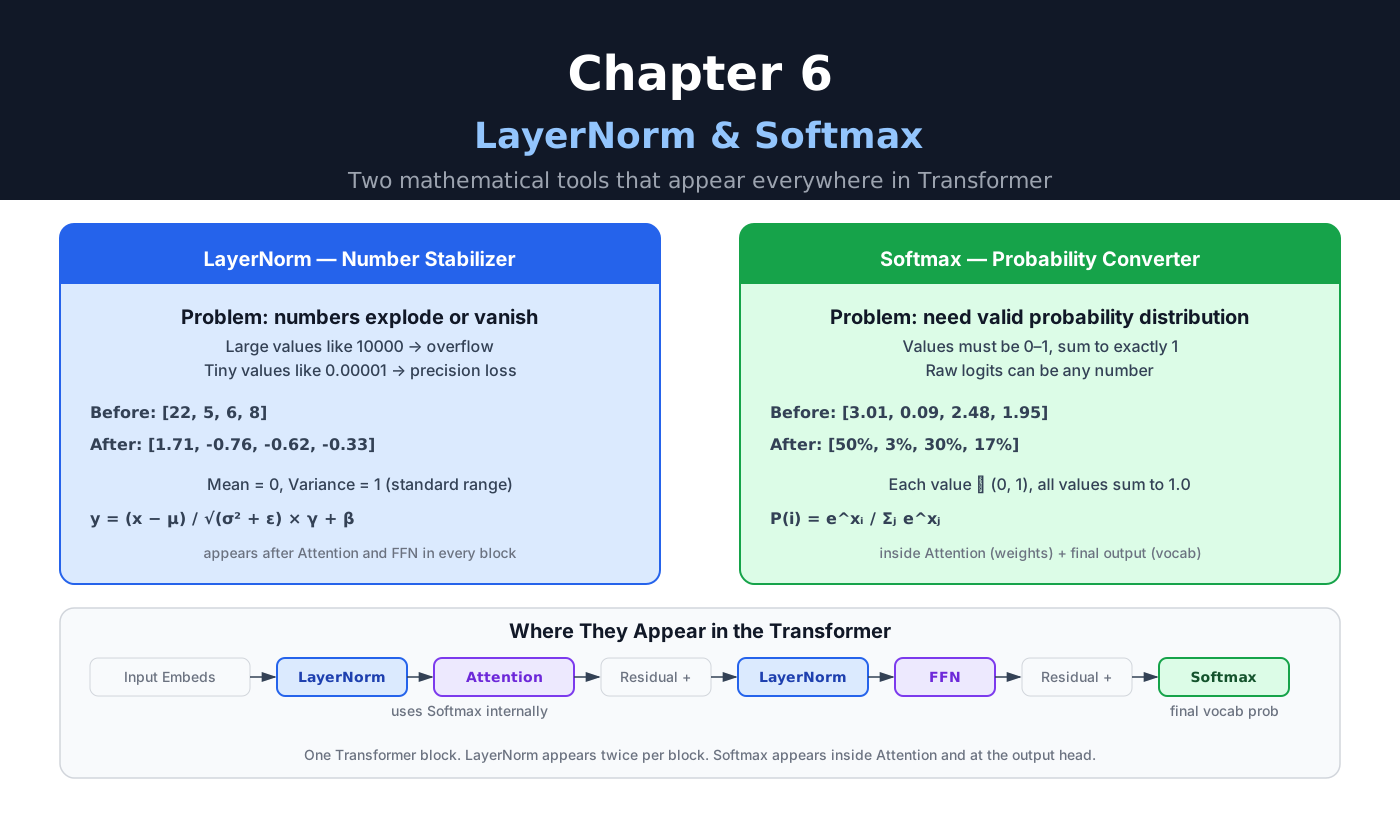
Transformer blocks repeat multiplication and addition many times. As the network gets deeper, activation scales can drift apart, making optimization harder and, in extreme cases, causing numerical overflow or weak gradient signals.
Two lightweight operations help with this:
- LayerNorm (or its close relative RMSNorm) appears around sub-layers and keeps activation scales manageable.
- Softmax appears inside Attention. At the model output, it is used when inference needs probabilities or sampling.
Neither is complicated. Both play an important role in stable training and useful inference.
6.2 LayerNorm: Keep the Scale Reasonable
6.2.1 The Problem: Numbers Drift
Neural network layers multiply and add. Repeating this can make different layers operate at very different scales:
too large:  10,000   100,000   → unstable optimization; possibly overflow
too small:  0.0001   0.00001   → useful changes and gradients can be hard to resolve
Normalization brings those values back to a predictable scale and generally makes optimization more stable.
6.2.2 What LayerNorm Does
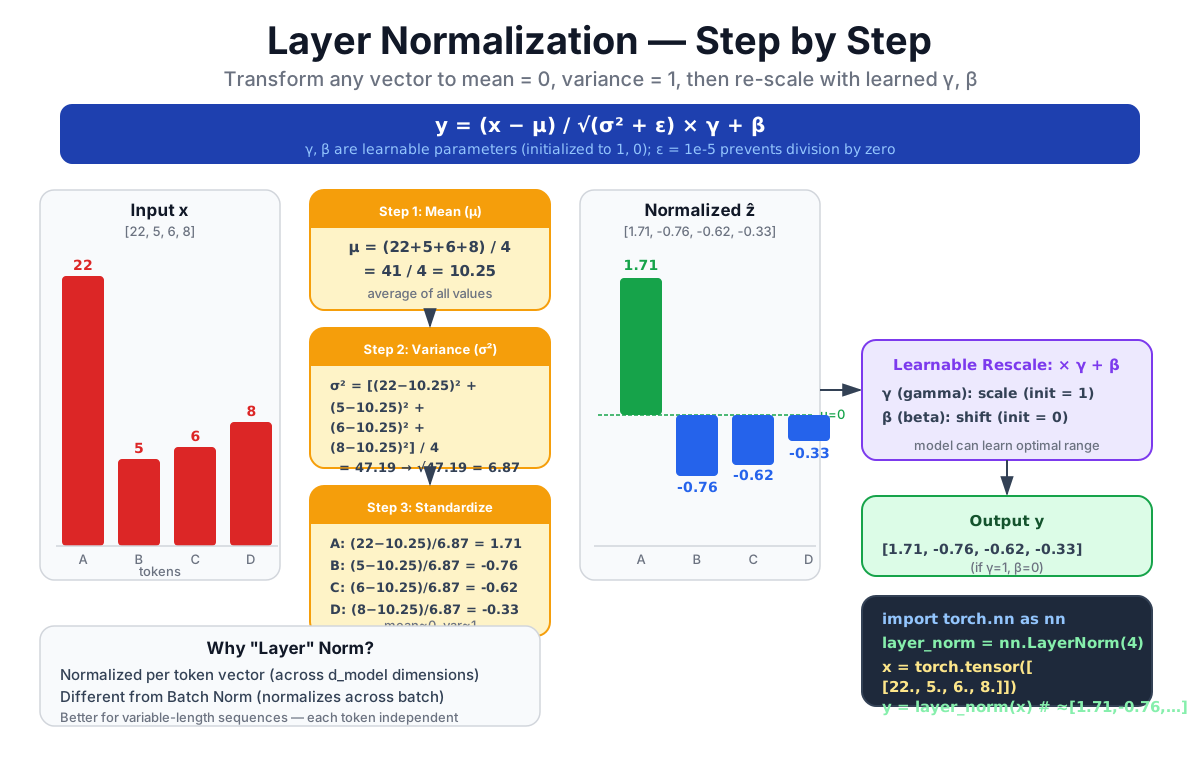
Layer Normalization normalizes the feature values within a single token vector. For each token:
- Compute the mean across all
d_modeldimensions. - Compute the variance.
- Subtract the mean and divide by the standard deviation.
- Apply learned scale
γand shiftβparameters.
The formula:
y = (x - μ) / √(σ² + ε) × γ + βBreaking it down:
x - μ: subtract the mean, so the result is centered at zero./ √(σ² + ε): divide by the standard deviation, so the spread becomes approximately one. The small implementation-dependentεprevents division by zero.× γ + β: apply learnable scale and bias. This lets the model choose a different output range if that turns out to be useful.γandβstart at1and0and are updated during training.
Strictly speaking, mean 0 and variance 1 describe the normalized values before γ and β. The final output keeps those statistics only when γ = 1 and β = 0.
6.2.3 Worked Example
Suppose a token's four-dimensional activation vector is [22, 5, 6, 8].
Step 1: compute the mean
μ = (22 + 5 + 6 + 8) / 4 = 41 / 4 = 10.25Step 2: compute the variance
σ² = ((22 - 10.25)² + (5 - 10.25)² + (6 - 10.25)² + (8 - 10.25)²) / 4
   = (138.06 + 27.56 + 18.06 + 5.06) / 4
   = 47.19
Step 3: normalize
dim0: (22 - 10.25) / √47.19 = 11.75 / 6.87 ≈  1.71
dim1: ( 5 - 10.25) / √47.19 = -5.25 / 6.87 ≈ -0.76
dim2: ( 6 - 10.25) / √47.19 = -4.25 / 6.87 ≈ -0.62
dim3: ( 8 - 10.25) / √47.19 = -2.25 / 6.87 ≈ -0.33
With γ = 1 and β = 0, the result is [1.71, -0.76, -0.62, -0.33]: mean ≈ 0 and variance ≈ 1.
6.2.4 PyTorch Implementation
import torch
import torch.nn as nn

layer_norm = nn.LayerNorm(normalized_shape=4, bias=True)

x = torch.tensor([[22.0, 5.0, 6.0, 8.0]])
y = layer_norm(x)
print(y) # approximately [1.71, -0.76, -0.62, -0.33]nn.LayerNorm handles the formula above. The normalized_shape tells it which dimension to normalize over. In a real Transformer, that dimension is d_model.
The other constructor arguments and their defaults (checked on PyTorch 2.11):
eps=1e-5is theεin the formula.elementwise_affine=Truecreates the learnableγ(initialized to ones) andβ(initialized to zeros), each with shapenormalized_shape.bias=Falsekeepsγbut dropsβ.
PyTorch computes the variance with the biased estimator: it divides by d_model, not d_model − 1. The worked example above did the same, which is why the numbers match.
6.2.5 Why "Layer" Norm?
The normalization is applied per token, across the feature (layer) dimension — not across the batch. Each token's vector is independently normalized. Different tokens do not interfere with each other's statistics.
This contrasts with Batch Normalization, which uses statistics across examples (and, for some tasks, spatial or position dimensions). LayerNorm does not depend on the other examples in a batch, which makes it a natural fit for variable-length sequences.
6.2.6 Where LayerNorm Appears
In a standard decoder-only block, normalization usually appears around two sub-layers:
Input
  ↓
LayerNorm                   <- first application
  ↓
Masked Multi-Head Attention
  ↓
Residual connection
  ↓
LayerNorm                   <- second application
  ↓
Feed Forward Network (FFN)
  ↓
Residual connection
  ↓
Output
The original Transformer encoder had two sub-layers, while its decoder had three because it also included cross-attention. It used post-norm: LayerNorm after each sub-layer and residual addition. GPT-2 moved LayerNorm to the input of each sub-block and added a final norm, helping establish the pre-norm pattern used by many later decoder-only LLMs.
Many modern LLMs, including Llama 2, use RMSNorm instead. It preserves the same core intuition—control the scale—but does not subtract the mean and usually has no β: y = x / √(mean(x²) + ε) × γ. PyTorch provides it as nn.RMSNorm. It is a close relative of LayerNorm, not the same operation.
6.3 Softmax: Turning Scores Into Probabilities
6.3.1 The Problem: We Need Probabilities
Two places in the Transformer need probability distributions:
- Inside Attention: after computing scaled, masked Query–Key scores, we need weights that sum to 1.
- At the final output: after projecting the final hidden state onto the vocabulary, we need the model to express a distribution over all possible next tokens.
Probabilities have two requirements: every value is between 0 and 1, and all values sum to exactly 1. Raw scores from matrix multiplication satisfy neither.
6.3.2 What Softmax Does
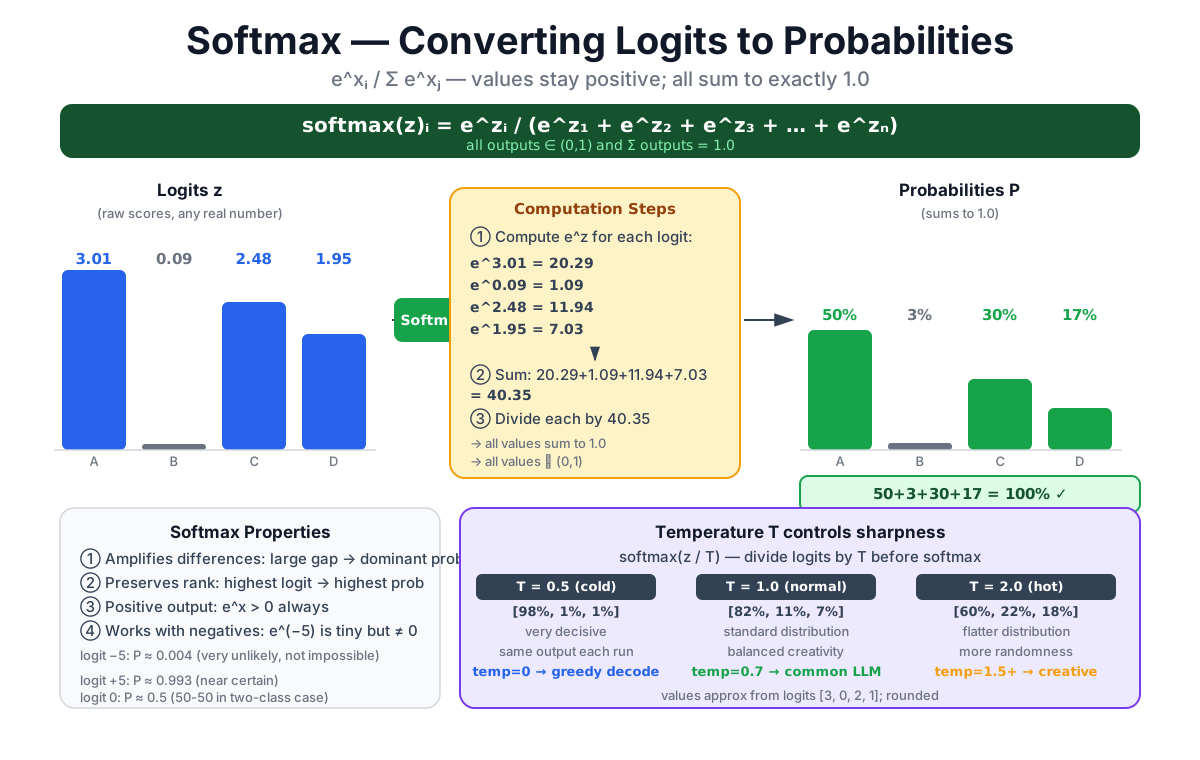
Softmax transforms any vector of real numbers into a valid probability distribution.
Using the vocabulary output as an example — the model's raw scores (logits) for four candidate next tokens:
Input logits: request = 3.01, tab = 0.09, quote = 2.48, other = 1.95
Output probabilities: request = 50.28%, tab = 2.71%, quote = 29.59%, other = 17.42%
After Softmax:
- Every value is between 0 and 1.
- All values sum to 100%.
6.3.3 The Softmax Formula
In words:
- Raise
e ≈ 2.718to the power of each score. - Divide each result by the sum of all results.
Computers normally subtract the largest logit first: softmax(z) = softmax(z - max(z)). This leaves the probabilities unchanged while preventing a large e^z from overflowing.
6.3.4 Worked Example
Input logits: [3.01, 0.09, 2.48, 1.95]
Step 1: exponentiate
e^3.01 = 20.29
e^0.09 =  1.09
e^2.48 = 11.94
e^1.95 =  7.03
Step 2: sum
total = 20.29 + 1.09 + 11.94 + 7.03 = 40.35Step 3: divide
request: 20.29 / 40.35 = 0.5028 = 50.28%
tab:      1.09 / 40.35 = 0.0271 =  2.71%
quote:   11.94 / 40.35 = 0.2959 = 29.59%
other:    7.03 / 40.35 = 0.1742 = 17.42%
6.3.5 Three Properties Worth Knowing
1. Converts score gaps into probability ratios: P(i) / P(j) = e^(z_i-z_j). The largest logit dominates only when its lead is large enough.
2. Preserves order: if logit A > logit B, then P(A) > P(B). The highest score remains the highest probability.
3. Handles negative inputs: exponentiation always returns a positive number (e^x > 0 for all x), so even negative logits produce valid probabilities.
6.3.6 PyTorch Implementation
import torch
import torch.nn.functional as F

logits = torch.tensor([3.01, 0.09, 2.48, 1.95])

probs = F.softmax(logits, dim=0)
print(probs)       # tensor([0.5028, 0.0271, 0.2959, 0.1742])
print(probs.sum()) # tensor(1.0000)
6.4 Where They Sit in the Architecture
6.4.1 The Full Output Flow
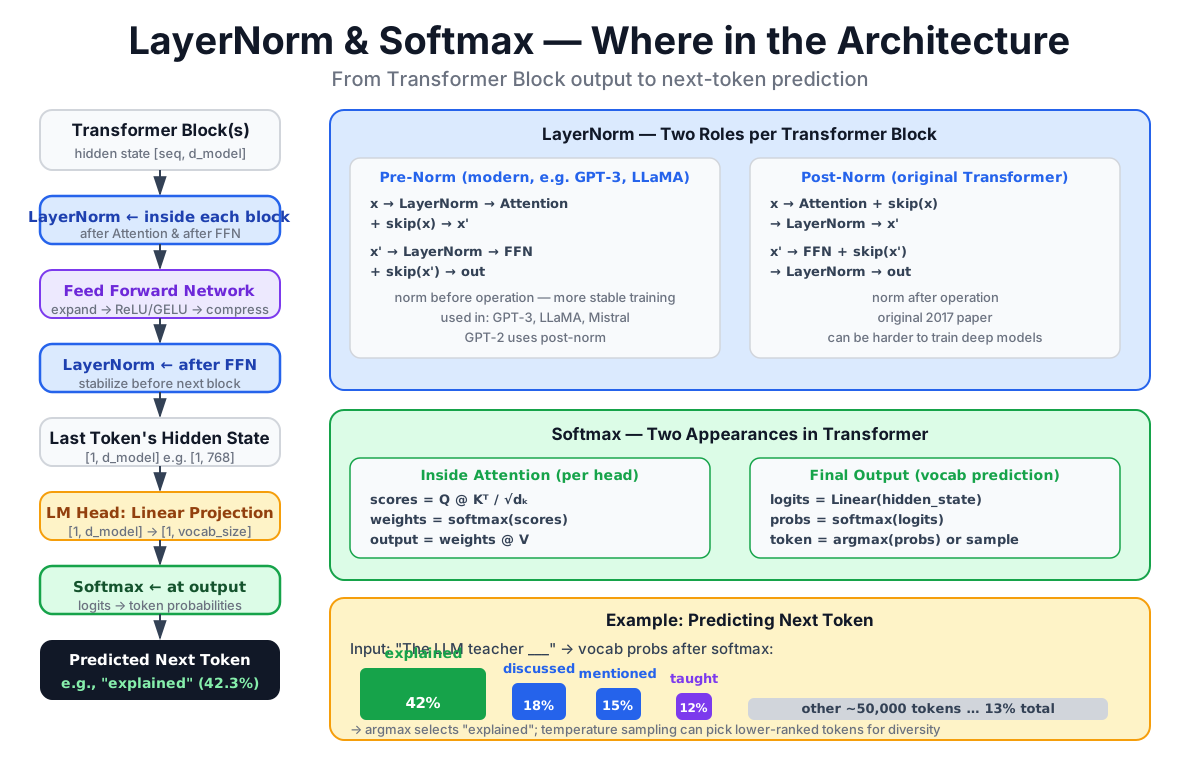
From the final Transformer block to next-token prediction:
Transformer block output
        ↓
Final Norm
        ↓
Linear projection (d_model → vocab_size)
        ↓
Logits
  ├─ training: CrossEntropyLoss(logits, target)
  ├─ greedy decoding: argmax(logits)
  └─ sampling: Softmax(logits / T), then sample
The linear projection maps the final hidden state from d_model dimensions to vocab_size dimensions. For a hypothetical d_model = 4096 and vocab_size = 100,000, that matrix contains 4096 × 100,000 = 409.6 million entries. It is often called the LM Head. Some models tie this matrix to the input embedding weights, so those entries are not always an additional set of parameters.
6.4.2 How They Work Together
LayerNorm and Softmax do different jobs at different points, but they cooperate:
- LayerNorm stabilizes activations between sub-layers, keeping their scale manageable for the next computation.
- After all the blocks, many pre-norm decoders pass the hidden state through a final LayerNorm or RMSNorm and then the LM Head.
- During training, cross-entropy normally accepts logits directly and computes a numerically stable log-softmax internally. During inference, Softmax is needed when we want probabilities or sampling. Greedy decoding can take
argmax(logits)directly because Softmax preserves the ordering.
Inside Attention, Softmax converts the scaled, masked scores QKᵀ/√d_k + mask into attention weights whose rows sum to 1.
6.5 Temperature: Controlling the Distribution Shape
When you call an inference API and set temperature, you are modifying how Softmax behaves at the output layer.
6.5.1 The Temperature Formula
Dividing logits by T before Softmax changes the shape of the resulting distribution:
- T < 1 (low temperature): dividing by a small number makes large logits even larger in relative terms. The distribution sharpens — the top token dominates.
- T = 1 (default): standard Softmax, no modification.
- T > 1 (high temperature): logit differences shrink. The distribution flattens — lower-probability tokens get more weight.
6.5.2 Numerical Example
Logits: [3.0, 1.0, 0.5]
| Temperature | Probabilities (approx.) | Character |
|---|---|---|
| T = 0.5 | [0.976, 0.018, 0.007] | Sharp — most probability sits on the first token |
| T = 1.0 | [0.821, 0.111, 0.067] | Standard distribution |
| T = 2.0 | [0.604, 0.222, 0.173] | Flatter — the other tokens get more weight |
Values computed via
softmax(logits / T), rounded to three decimal places. The displayed values may therefore differ from 1 by 0.001.
6.5.3 Practical Implications
In the formula, T must be greater than zero; literal T = 0 would divide by zero. Many inference tools use temperature = 0 as a convention for greedy decoding, but the exact behavior belongs to the implementation.
- Lower temperature concentrates the distribution, so sampling is usually more conservative.
- Higher temperature flattens it, so sampling is usually more diverse and more likely to leave the highest-probability path.
Temperature changes how decoding uses the model's logits; it does not change what the model has learned. Even greedy decoding is not a universal promise of byte-for-byte reproducibility: hardware, parallel arithmetic, and serving implementations can still matter.
6.6 Chapter Summary
6.6.1 Side-by-Side Comparison
| Property | LayerNorm | Softmax |
|---|---|---|
| Purpose | normalize activations | convert scores to probabilities |
| Output range | mean ≈ 0, variance ≈ 1 before scale/shift | [0, 1] per element, sums to 1 |
| Where it appears | around Attention/FFN; often a final norm | inside Attention; output sampling when needed |
| Learnable params | yes (γ and β) | no (but temperature is a hyperparameter) |
6.6.2 Formula Reference
LayerNorm:
y = (x - mean(x)) / std(x) × γ + βSoftmax:
P(i) = e^(x_i) / Σ_j e^(x_j)Softmax with temperature:
P(i) = e^(x_i / T) / Σ_j e^(x_j / T)6.6.3 Core Takeaway
LayerNorm—and its relative RMSNorm—acts like a ruler that brings intermediate values back to a manageable scale. Softmax is the probability converter used when Attention or sampling needs a distribution. Small operations, large impact.
Chapter Checklist
After this chapter, you should be able to:
- Explain why LayerNorm is needed: stacked matrix multiplications cause activation drift.
- Work through a LayerNorm calculation by hand given a small input vector.
- Explain Softmax as an exponentiate-then-normalize operation.
- Work through a Softmax calculation by hand given a small logit vector.
- State where LayerNorm, RMSNorm, and Softmax appear in the Transformer architecture.
- Explain what temperature controls and the practical effect of low vs. high values.
See You in the Next Chapter
That covers the two lightweight tools that quietly hold the whole system together. If you can sketch where LayerNorm and Softmax appear in a Transformer block diagram, you are ready to move forward.
Chapter 7 introduces the Feed Forward Network — the other major component inside each Transformer block, the one that holds most of the model's parameters. The good news: once you understand matrix multiplication and activation functions, the FFN is straightforward.