One-sentence summary: Learning rate controls the scale of each optimizer update. Too large can make training oscillate or diverge; too small makes it crawl. It is not “a percentage of the gradient,” and there is no universal magic value.
17.1 What Is a Learning Rate?
17.1.1 Start with plain SGD
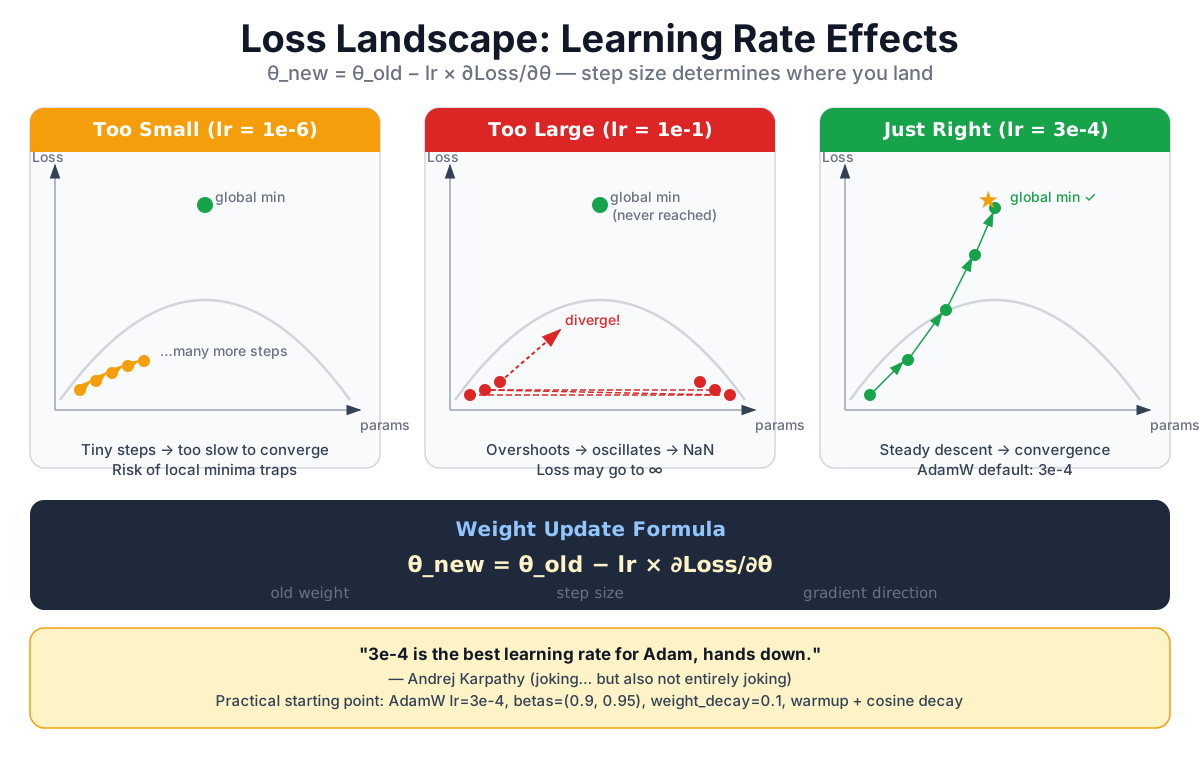
Training starts by computing how the loss changes with each parameter. The optimizer then changes those parameters. For plain gradient descent (SGD), the rule is:
Here:
- is the parameter before the update;
- is the current gradient;
- (eta) is the learning rate.
A one-parameter example:
learning_rate = 0.1
old_weight    = 0.90
gradient      = -0.4

new_weight = 0.90 - 0.1 × (-0.4)
           = 0.94
The gradient is negative, so moving against it increases this weight. It changes from 0.90 to 0.94.
17.1.2 It is not a percentage
lr = 0.1 means multiplying the gradient by the scalar 0.1. It does not generally mean “take ten percent of the gradient.” Parameter, gradient, and loss scales all depend on the model's parameterization, so 0.1 has no built-in percentage interpretation.
The equation above also describes only plain SGD. Adam and AdamW first transform the gradient using running first and second moments. In modern Transformer training, the more faithful intuition is: learning rate controls the overall scale of the optimizer's update.
17.2 Steps That Are Too Small, Too Large, or Workable
Imagine descending a foggy hillside. You can feel the steepest local direction under your boots, but you cannot see the entire landscape.
Too small:
- Every step is short, so loss may fall very slowly.
- Within a fixed training budget, it can look as if the model learned nothing.
- Slow movement does not automatically mean being trapped in a local minimum.
Too large:
- Updates can overshoot a valley and bounce across it.
- The update size may grow until loss diverges or becomes
NaN. - Mixed-precision training may expose the numerical instability sooner.
In a workable range:
- Training loss trends downward.
- Update sizes do not suddenly explode.
- The run makes more progress under the same compute budget than one with a tiny rate.
“Workable range” is deliberate wording; there is rarely one perfect learning rate. The bowl is only an intuition pump. A real Transformer loss is a high-dimensional surface with saddle points, flat directions, and parameter symmetries. A two-dimensional sketch cannot show us a global minimum.
You may have seen the old joke that the answer for Adam is always 3e-4. It works as a joke because that number really does appear in some recipes. Change the model scale, batch, data, parameterization, or schedule, though, and it is no longer the same problem.
17.3 Which Parameters Actually Update?
A fully trained Transformer commonly has learnable parameters in:
- Token embeddings:
vocab_size × d_model; - Attention projections:
Wq,Wk,Wv, andWo; - FFN projections: two matrices in a classic FFN, or several in a gated FFN;
- Normalization: LayerNorm scale and bias, or RMSNorm scale;
- Output projection: hidden states to vocabulary logits.
The output projection is not always another independent matrix. GPT-2-style models commonly tie it to the token-embedding weight, so the two locations refer to the same parameter.
For a PyTorch parameter to change during a particular optimizer.step(), it normally must:
- have
requires_grad=True; - participate in the graph from parameters to loss and receive a gradient;
- belong to that optimizer.
If param.grad is None, PyTorch optimizers usually skip it. A zero-valued gradient tensor is different: momentum or AdamW weight decay can still change the parameter.
One optimizer.step() walks through every parameter group, but the parameters do not all take an identical step. Groups may have different learning rates, and AdamW's running moments produce different coordinate-wise effective updates.
17.4 One PyTorch Step That Is Actually Connected
This tiny classifier is intentionally plain. The important part is that the loss comes from this model and the optimizer owns the very same parameters:
import torch
import torch.nn.functional as F

torch.manual_seed(7)

model = torch.nn.Sequential(
    torch.nn.Linear(4, 8),
    torch.nn.GELU(),
    torch.nn.Linear(8, 5),
)
optimizer = torch.optim.AdamW(
    model.parameters(), lr=1e-3, weight_decay=0.01
)

x = torch.randn(6, 4)
targets = torch.tensor([0, 3, 1, 4, 2, 3])
before = model[0].weight.detach().clone()

optimizer.zero_grad(set_to_none=True)
logits = model(x)
loss = F.cross_entropy(logits, targets)
loss.backward()
grad_norm = torch.nn.utils.clip_grad_norm_(model.parameters(), 1.0)
optimizer.step()

max_change = (model[0].weight.detach() - before).abs().max().item()
assert max_change > 0
print(f"loss={loss.item():.4f}, grad_norm={grad_norm:.4f}")
print(f"max parameter change={max_change:.6f}")
The order matters:
zero_grad()clears gradients accumulated from the previous step.- The forward pass produces
logitsandloss. loss.backward()computes gradients.- Optional gradient clipping limits the global gradient norm.
optimizer.step()finally changes the parameters.
Do not rely on weights rounded to four decimals to prove an update happened. Save a copy before the step and measure the difference afterward.
17.5 SGD, Adam, and AdamW Are Different Updates
17.5.1 SGD: the transparent baseline
optimizer = torch.optim.SGD(model.parameters(), lr=0.01)Without momentum, this is the earlier rule. It is excellent for explaining learning rate, but other optimizers do not apply the raw gradient unchanged.
17.5.2 Adam: use the gradient's history
Adam tracks a first moment and second moment . After bias correction, its update is roughly:
This creates a normalized, coordinate-wise update. A tactile analogy is tuning a theremin: the same hand movement can produce very different pitch changes depending on where your hand already is, so you adjust using both direction and recent sensitivity. Adam similarly uses more than the current slope. It does not automatically discover the best learning rate for every parameter.
17.5.3 AdamW: decouple weight decay
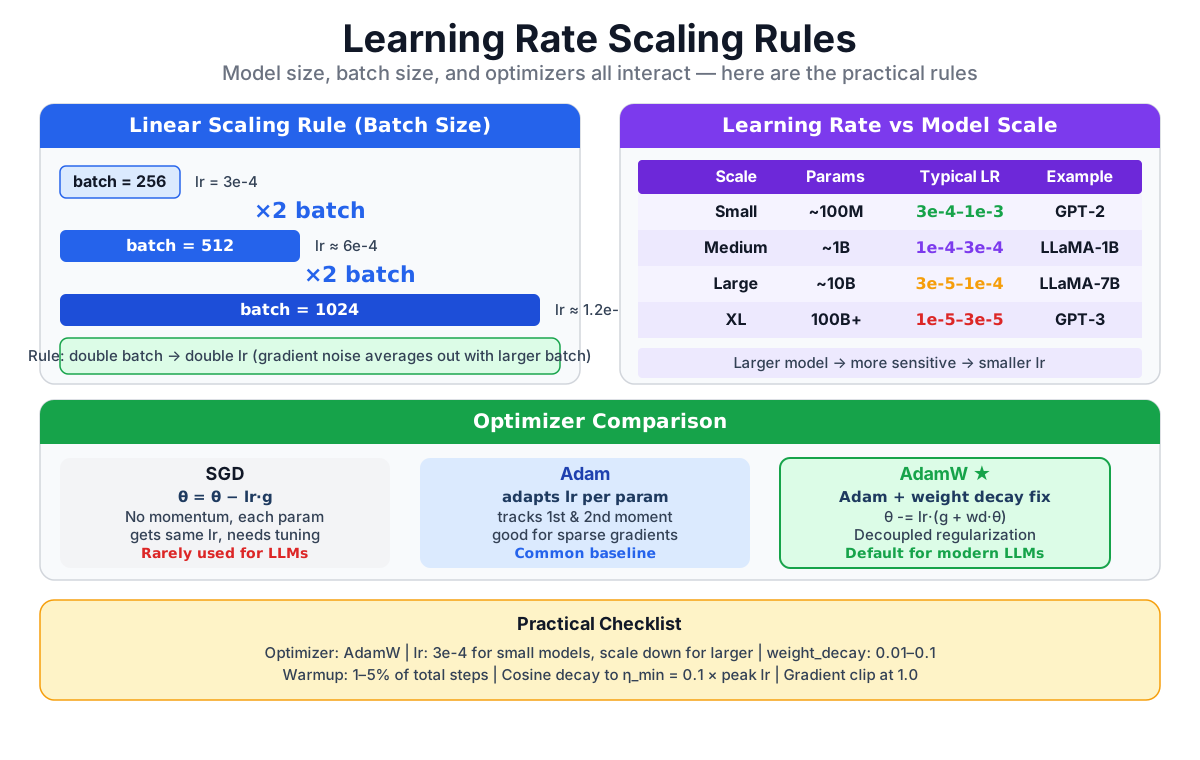
The important move in AdamW is to separate weight decay from the adaptively normalized loss-gradient update. Ignoring implementation details, one step can be understood as:
Here is the weight-decay coefficient. Under common conditions, L2 regularization and weight decay are equivalent for SGD. Under adaptive preconditioning such as Adam's, they generally are not.
AdamW is a strong and common Transformer baseline, not the only correct optimizer for every task and scale. Many recipes decay matrix-like weights while placing biases and normalization parameters in a weight_decay=0 parameter group.
17.6 Why Change the Learning Rate During Training?
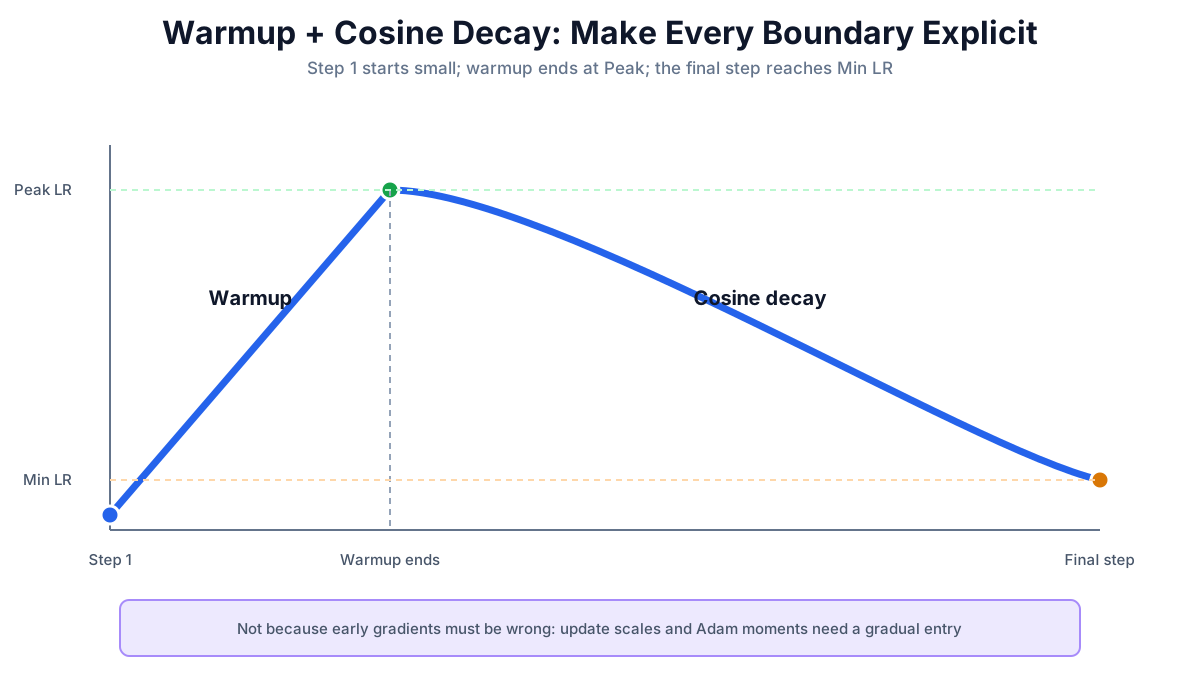
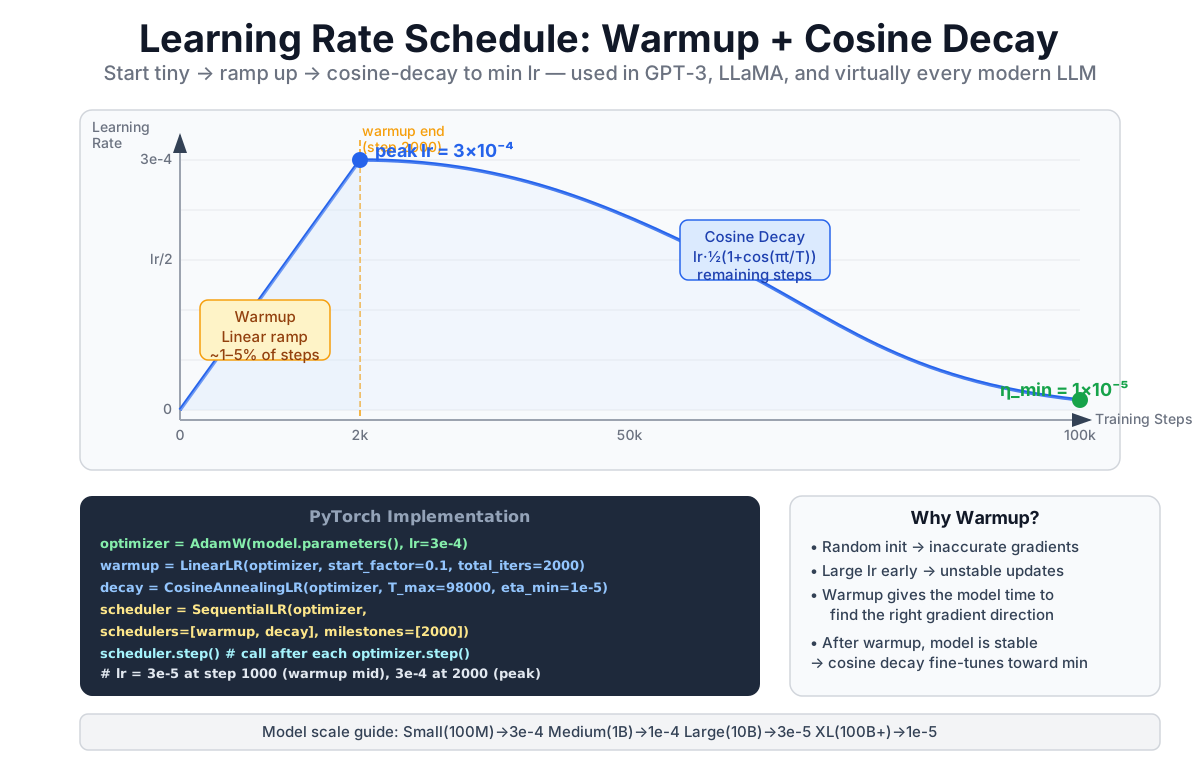
A fixed rate can train a model, but many Transformer recipes use warmup + decay:
- Warmup raises the rate gradually from a small value to a peak.
- Decay reduces it afterward; cosine decay is one common choice.
- Final rate may be zero or a small fraction of the peak.
Warmup is not needed because early gradients are necessarily “wrong.” At the beginning, activation and gradient scales are still settling, and Adam's moment estimates have little history. Jumping immediately to the peak can create an unstable update-to-weight ratio. Warmup enters the useful range gradually.
The next function makes every boundary explicit. Training steps run from 1 through total_steps; the rate reaches peak_lr exactly at warmup_steps and min_lr on the final step.
import math

def lr_at_step(step, total_steps, warmup_steps, peak_lr, min_lr):
    assert 1 <= step <= total_steps
    assert 0 < warmup_steps < total_steps

    if step <= warmup_steps:
        return peak_lr * step / warmup_steps

    progress = (step - warmup_steps) / (total_steps - warmup_steps)
    cosine = 0.5 * (1.0 + math.cos(math.pi * progress))
    return min_lr + (peak_lr - min_lr) * cosine

for step in range(1, total_steps + 1):
    lr = lr_at_step(step, total_steps, warmup_steps, peak_lr, min_lr)
    for group in optimizer.param_groups:
        group["lr"] = lr

    optimizer.zero_grad(set_to_none=True)
    loss = compute_loss(model, batch)
    loss.backward()
    torch.nn.utils.clip_grad_norm_(model.parameters(), 1.0)
    optimizer.step()
There is exactly one optimizer.step() per batch, and the cosine phase uses the number of remaining steps rather than accidentally reusing the total length.
17.7 Published Recipes Are References, Not Prescriptions
17.7.1 No public model gives us a universal number
Peak learning rates sometimes fall as models grow within one family, but parameter count alone does not determine the answer. These are reported training configurations, not recommendations detached from their experiments:
| Published model | Parameters | Global batch (tokens) | Peak LR |
|---|---|---|---|
| GPT-3 Small | 125M | 0.5M | 6e-4 |
| GPT-3 XL | 1.3B | 1.0M | 2e-4 |
| GPT-3 13B | 13B | 2.0M | 1e-4 |
| GPT-3 175B | 175B | 3.2M | 6e-5 |
| LLaMA 7B / 13B | 7B / 13B | 4.0M | 3e-4 |
| LLaMA 33B / 65B | 33B / 65B | 4.0M | 1.5e-4 |
The figures come from GPT-3 Table 2.1 and LLaMA Table 2. LLaMA also reports AdamW, betas=(0.9, 0.95), weight_decay=0.1, gradient clipping at 1.0, 2,000 warmup steps, and cosine decay to 10% of the peak. Read those values as one recipe; copying only 3e-4 throws away the conditions that made it meaningful.
17.7.2 Does doubling batch size mean doubling LR?
The linear scaling rule—double the batch, double the rate—came from Goyal and colleagues' large-batch ResNet-50/ImageNet experiments with synchronous SGD and warmup. It is a useful starting hypothesis under those conditions, not a universal law for LLMs trained with AdamW.
Changing global batch, sequence length, gradient accumulation, parallelism, or model width creates a configuration worth re-testing. Watch not only loss, but gradient norm, the update-to-weight ratio, and validation progress under an equal token budget.
17.7.3 An honest starting point
For the small model built in this book, the following is a candidate to test, not “the large-model default”:
optimizer = torch.optim.AdamW(
    model.parameters(),
    lr=3e-4,
    betas=(0.9, 0.95),
    weight_decay=0.1,
)
Run short, equal-token probes at values such as 1e-4, 3e-4, and 6e-4. This is not a search for the final optimum; it tells you whether the order of magnitude is obviously wrong before you spend the full budget.
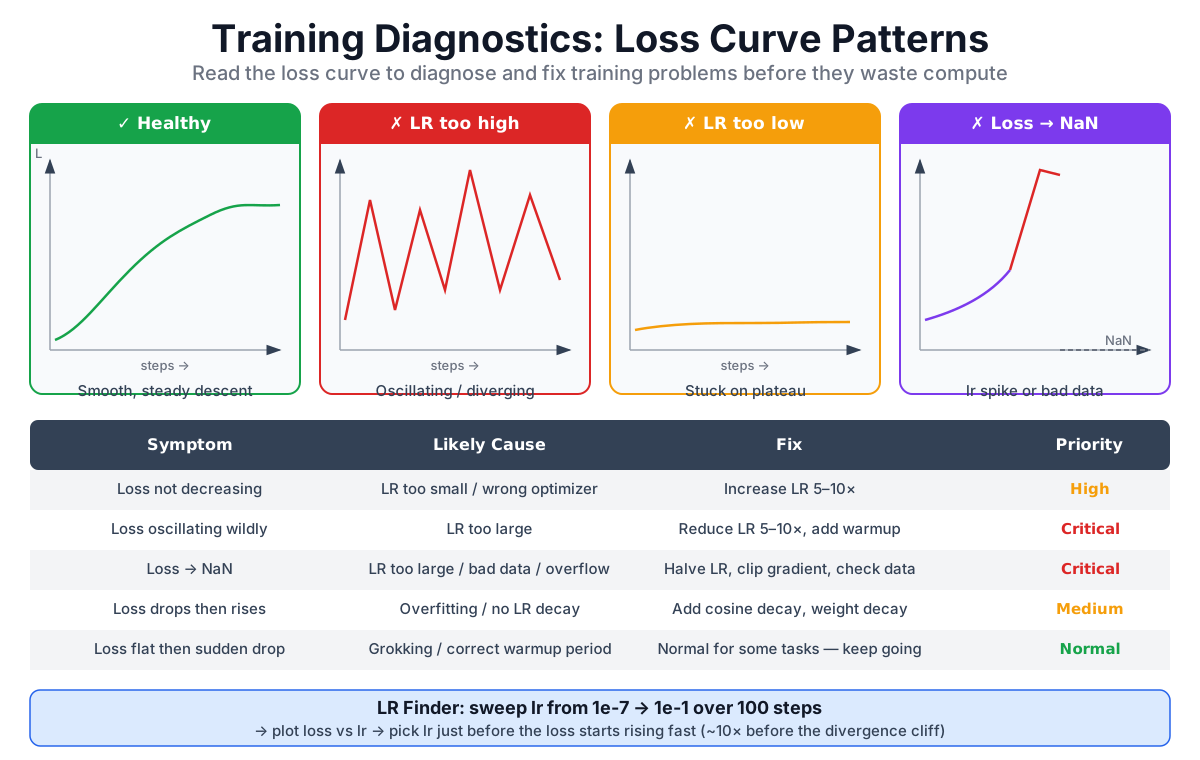
17.8 Do Not Blame Every Symptom on Learning Rate
| Symptom | Learning-rate possibility | Also inspect |
|---|---|---|
| Training loss barely moves | Rate may be too small | Shifted labels, frozen parameters, disconnected loss, data or code bugs |
| Loss oscillates sharply | Rate may be too large | Tiny batches, outlier samples, gradient spikes |
Loss becomes NaN / Inf | Rate or update may be too large | Mixed-precision overflow, bad data, normalization, division, or masking bugs |
| Training loss falls; validation rises | Schedule may be poor | Overfitting, distribution shift, contaminated or tiny validation set |
| Training loss falls, then rises | Peak or schedule may be wrong | Data-order change, bad checkpoint restore, numerical instability |
A learning-rate finder can be a small-scale diagnostic, but an expensive LLM pretraining run does not yield one timeless “best rate” from a single sweep. Use short probes to remove obviously bad choices, then confirm under the real batch, precision, and distributed setup.
17.9 Chapter Summary
- In SGD, learning rate directly scales the gradient. In AdamW, it scales a moment-normalized update and also affects the strength of decoupled weight decay.
- Too large can oscillate or diverge; too small wastes the training budget. Seek a stable, productive range rather than a universal constant.
- A parameter must be trainable, connected to the loss, receive a gradient, and belong to the optimizer. Parameter groups and adaptive normalization make effective steps differ.
- Warmup + cosine decay is common, not mandatory. State the boundaries, total steps, and final rate precisely.
- Read GPT-3 and LLaMA learning rates together with model scale, batch, and the rest of each optimizer recipe.
Chapter Checklist
After this chapter, you should be able to:
- Explain learning rate with the SGD equation without calling it a percentage
- Distinguish the SGD, Adam, and AdamW updates
- Write a connected forward, backward, clipping, and optimizer step
- Implement warmup + cosine decay with explicit boundaries
- Use a published recipe as evidence, not as a universal default
Part 4 Summary
Congratulations—you have completed Part 4: The Complete Architecture.
| Chapter | Topic | Core idea |
|---|---|---|
| 13 | Residuals and Dropout | Residual branches provide short paths; Dropout masks activations only during training |
| 14 | Token + position | Addition preserves d_model width and places both signals in one residual stream |
| 15 | Full forward pass | The complete path from token IDs to logits and training loss |
| 16 | Training vs inference | Training computes sequence positions in parallel; autoregressive decoding still has token-by-token dependence |
| 17 | Learning rate | How gradients, optimizers, parameter updates, and schedules connect |
You can now follow not only the Transformer's forward pass, but also the path by which error returns through the graph and finally changes the parameters.
See You in the Next Chapter
Part 5 turns the architecture into code:
- Chapter 18: Writing
model.py - Chapter 19: Writing
train.py - Chapter 20: Writing
inference.py
We will begin with the model definition and turn each block from the earlier chapters into runnable code.