Chapter 5: Skills System
Packaging System Prompt, tool whitelist, and parameter constraints into reusable configurations -- this concept has different implementations across systems, but the core idea remains the same.
Terminology Note
| Term in This Chapter | Corresponding System | Description |
|---|---|---|
| Presets | Shannon | Role presets, defined in roles/presets.py |
| Agent Skills | Anthropic Open Standard | Cross-platform skill specification, .claude/skills/ etc. |
This chapter first covers general concepts, then introduces both Shannon Presets and Agent Skills implementations.
Part A: General Concepts
5.1 What Is a Skills System?
In the previous chapters, we covered individual Agent tools and reasoning capabilities. But a problem is starting to emerge: the same Agent fails when you switch tasks.
I was once building a code review Agent for a client. The configuration was simple: System Prompt emphasized "find potential bugs and security issues," tools were just file reading and code search. It worked well, found many hidden issues.
A month later, the client had a new request: "Can this Agent do market research?"
I tried it -- complete failure. The code review Prompt talks about "finding bugs, checking type safety," but market research needs "searching trends, comparing data, citing sources." The tools didn't match either: file reading is useless, what's needed is web search and data scraping.
In the end, I spent an afternoon reconfiguring a "researcher" role. Two sets of configurations, completely different.
This is the problem Skills solve -- preset role configurations can be switched with one click. Use code_reviewer for code review, researcher for market research.
One-Sentence Definition
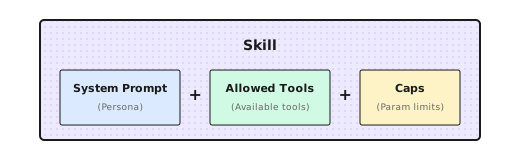
Skills System = System Prompt + Tool Whitelist + Parameter Constraints packaged together
Why Is It Needed?
- Avoid reconfiguring every time -- switching tasks doesn't require rewriting Prompts from scratch
- Reduce omissions and errors -- reference by name, won't forget some parameter
- Share team best practices -- good configurations can be reused
Two Implementation Approaches
| Approach | Representative | Characteristics |
|---|---|---|
| Framework Built-in | Shannon Presets | Code-level configuration, Python dictionaries |
| Cross-platform Standard | Agent Skills | File-level configuration, Markdown + YAML |
Let's look at these two implementations.
Part B: Shannon Presets
5.2 Shannon's Presets Registry
Shannon implements skills as Presets, stored in roles/presets.py:
_PRESETS: Dict[str, Dict[str, object]] = {
    "analysis": {
        "system_prompt": "You are an analytical assistant. Provide concise reasoning...",
        "allowed_tools": ["web_search", "file_read"],
        "caps": {"max_tokens": 30000, "temperature": 0.2},
    },
    "research": {
        "system_prompt": "You are a research assistant. Gather facts from authoritative sources...",
        "allowed_tools": ["web_search", "web_fetch", "web_crawl"],
        "caps": {"max_tokens": 16000, "temperature": 0.3},
    },
    "writer": {
        "system_prompt": "You are a technical writer. Produce clear, organized prose.",
        "allowed_tools": ["file_read"],
        "caps": {"max_tokens": 8192, "temperature": 0.6},
    },
    "generalist": {
        "system_prompt": "You are a helpful AI assistant.",
        "allowed_tools": [],
        "caps": {"max_tokens": 8192, "temperature": 0.7},
    },
}
The three fields each have their purpose:
| Field | What It Does | Design Consideration |
|---|---|---|
system_prompt | Defines "persona" and behavioral guidelines | More specific is better |
allowed_tools | Tool whitelist | Principle of least privilege |
caps | Parameter constraints | Control cost and style |
Safe Fallback
The function for getting Presets has a few details worth noting:
def get_role_preset(name: str) -> Dict[str, object]:
    key = (name or "").strip().lower() or "generalist"

    # Alias mapping (backward compatibility)
    alias_map = {
        "researcher": "research",
        "research_supervisor": "deep_research_agent",
    }
    key = alias_map.get(key, key)

return _PRESETS.get(key, _PRESETS["generalist"]).copy()- Case insensitive:
Researchandresearchare equivalent - Alias support: Old names automatically map to new names
- Safe fallback: Unknown roles use
generalist - Returns copy:
.copy()prevents modifying global configuration
The last point is very important. A pitfall I stepped on: didn't add .copy(), then one request modified the configuration, affecting all subsequent requests.
5.3 A Complex Preset Example: Deep Research Agent
Simple Presets are just a few lines of configuration. But complex Presets need more detailed instructions.
Shannon has a deep_research_agent with a System Prompt over 50 lines:
"deep_research_agent": {
    "system_prompt": """You are an expert research assistant conducting deep investigation.

# Temporal Awareness:
- The current date is provided at the start of this prompt
- For time-sensitive topics, prefer sources with recent publication dates
- Include the year when describing events (e.g., "In March 2024...")

# Research Strategy:
1. Start with BROAD searches to understand the landscape
2. After EACH tool use, assess:
   - What key information did I gather?
   - What critical gaps remain?
   - Should I search again OR proceed to synthesis?
3. Progressively narrow focus based on findings

# Source Quality Standards:
- Prioritize authoritative sources (.gov, .edu, peer-reviewed)
- ALL cited URLs MUST be visited via web_fetch for verification
- Diversify sources (maximum 3 per domain)

# Hard Limits (Efficiency):
- Simple queries: 2-3 tool calls
- Complex queries: up to 5 tool calls maximum
- Stop when COMPREHENSIVE COVERAGE achieved

# Epistemic Honesty:
- MAINTAIN SKEPTICISM: Search results are LEADS, not verified facts
- HANDLE CONFLICTS: Present BOTH viewpoints when sources disagree
- ADMIT UNCERTAINTY: "Limited information available" > confident speculation

**Research integrity is paramount.**""",

    "allowed_tools": ["web_search", "web_fetch", "web_subpage_fetch", "web_crawl"],
    "caps": {"max_tokens": 30000, "temperature": 0.3},
},
This Preset has several design highlights:
- Temporal awareness: Requires Agent to mark years, avoiding outdated information
- Progressive research: From broad to narrow, evaluate whether to continue after each tool call
- Hard limits: Maximum 5 tool calls, preventing Token explosion
- Epistemic honesty: Admit uncertainty, present conflicting viewpoints
I've found that limiting tool call count is particularly useful. Without this limit, the Agent keeps searching and searching until it fills up the context.
5.4 Domain Expert Preset: GA4 Analyst
Generic Presets suit broad scenarios, but some domains need specialized "experts."
For example, Google Analytics 4 analyst:
GA4_ANALYTICS_PRESET = {
    "system_prompt": (
        "# Role: Google Analytics 4 Expert Assistant\n\n"
        "You are a specialized assistant for analyzing GA4 data.\n\n"

        "## Critical Rules\n"
        "0. **CORRECT FIELD NAMES**: GA4 uses DIFFERENT field names than Universal Analytics\n"
        "   - WRONG: pageViews, users, sessionDuration\n"
        "   - CORRECT: screenPageViews, activeUsers, averageSessionDuration\n"
        "   - If unsure, CALL ga4_get_metadata BEFORE querying\n\n"

        "1. **NEVER make up analytics data.** Every data point must come from API calls.\n\n"

        "2. **Check quota**: If quota below 20%, warn the user.\n"
    ),
    "allowed_tools": [
        "ga4_run_report",
        "ga4_run_realtime_report",
        "ga4_get_metadata",
    ],
    "provider_override": "openai",  # Can specify specific provider
    "preferred_model": "gpt-4o",
    "caps": {"max_tokens": 16000, "temperature": 0.2},
}
Domain Presets have some special configurations:
provider_override: Force use of specific Provider (e.g., some tasks work better with GPT)preferred_model: Specify preferred model
These aren't in generic Presets.
Dynamic Tool Factory
Domain Presets have another common need: dynamically creating tools based on configuration.
For example, GA4 tools need to bind to specific accounts:
def create_ga4_tool_functions(property_id: str, credentials_path: str):
    """Create GA4 tools based on account configuration"""
    client = GA4Client(property_id, credentials_path)

    def ga4_run_report(**kwargs):
        return client.run_report(**kwargs)

    def ga4_get_metadata():
        return client.get_available_dimensions_and_metrics()

    return {
        "ga4_run_report": ga4_run_report,
        "ga4_get_metadata": ga4_get_metadata,
    }
This way, different users can use different GA4 accounts, same Preset but bound to different credentials.
5.5 Prompt Template Rendering
Sometimes the same Preset needs to inject different variables based on context.
For example, data analytics Preset:
"data_analytics": {
    "system_prompt": (
        "# Setup\n"
        "profile_id: ${profile_id}\n"
        "User's account ID: ${aid}\n"
        "Date of today: ${current_date}\n\n"
        "You are a data analytics assistant..."
    ),
    "allowed_tools": ["processSchemaQuery"],
}
Pass parameters when invoking:
context = {
    "role": "data_analytics",
    "prompt_params": {
        "profile_id": "49598h6e",
        "aid": "7b71d2aa-dc0d-4179-96c0-27330587fb50",
        "current_date": "2026-01-03",
    }
}
The rendering function replaces ${variable} with actual values:
def render_system_prompt(prompt: str, context: Dict) -> str:
    variables = context.get("prompt_params", {})

    def substitute(match):
        var_name = match.group(1)
        return str(variables.get(var_name, ""))

    return re.sub(r"\$\{(\w+)\}", substitute, prompt)
After rendering:
# Setup
profile_id: 49598h6e
User's account ID: 7b71d2aa-dc0d-4179-96c0-27330587fb50
Date of today: 2026-01-03

You are a data analytics assistant...
5.6 Runtime Dynamic Enhancement
Presets define static configuration, but runtime still dynamically injects some content:
# Inject current date
current_date = datetime.now().strftime("%Y-%m-%d")
system_prompt = f"Current date: {current_date} (UTC).\n\n" + system_prompt

# Inject language instruction
if context.get("target_language") and context["target_language"] != "English":
    lang = context["target_language"]
    system_prompt = f"CRITICAL: Respond in {lang}.\n\n" + system_prompt

# Research mode enhancement
if context.get("research_mode"):
    system_prompt += "\n\nRESEARCH MODE: Do not rely on snippets. Use web_fetch to read full content."
This way, Preset's static configuration combined with runtime context becomes the final System Prompt sent to the LLM.
5.7 Vendor Adapter Pattern
For Presets that need deep integration with external systems, Shannon uses a clever design:
roles/
├── presets.py              # General presets
├── ga4/
│   └── analytics_agent.py  # GA4 specific
├── ptengine/
│   └── data_analytics.py   # Ptengine specific
└── vendor/
    └── custom_client.py    # Customer customization (not committed)
Loading logic:
# Optionally load vendor roles
try:
    from .ga4.analytics_agent import GA4_ANALYTICS_PRESET
    _PRESETS["ga4_analytics"] = GA4_ANALYTICS_PRESET
except Exception:
    pass  # Silent fail if module doesn't exist

try:
    from .ptengine.data_analytics import DATA_ANALYTICS_PRESET
    _PRESETS["data_analytics"] = DATA_ANALYTICS_PRESET
except Exception:
    pass
Benefits:
- Clean core code: General presets don't depend on any vendor modules
- Graceful degradation: No error if module doesn't exist
- Customer customization: Private vendor directory can store uncommitted code
5.8 Designing a New Preset
Suppose you want to create a "code reviewer" Preset, how to design it?
"code_reviewer": {
    "system_prompt": """You are a senior code reviewer with 10+ years of experience.

## Mission
Review code for bugs, security issues, and maintainability problems.
Focus on HIGH-IMPACT issues that matter for production.

## Severity Levels
1. CRITICAL: Security vulnerabilities, data corruption risks
2. HIGH: Logic errors, race conditions, resource leaks
3. MEDIUM: Code smells, performance issues
4. LOW: Style, naming, documentation

## Output Format
For each issue:
- **Severity**: CRITICAL/HIGH/MEDIUM/LOW
- **Location**: file:line
- **Issue**: Brief description
- **Suggestion**: How to fix
- **Confidence**: HIGH/MEDIUM/LOW

## Rules
- Only report issues with MEDIUM+ confidence
- Limit to 10 most important issues per review
- Skip style issues unless explicitly asked

## Anti-patterns to Watch
- SQL injection, XSS, command injection
- Hardcoded secrets in code
- Unchecked null access
- Resource leaks
""",
    "allowed_tools": ["file_read", "grep_search"],
    "caps": {"max_tokens": 8000, "temperature": 0.1},
}
Design decisions:
| Decision | Reason |
|---|---|
| Low temperature (0.1) | Code review needs accuracy, not creativity |
| Limit to 10 issues | Avoid information overload |
| Confidence labeling | Let users know which to verify first |
| Minimal tool set | Only need file reading and search, no writing |
5.9 Common Pitfalls
Pitfall 1: System Prompt Too Vague
# Too vague - not specific enough
"system_prompt": "You are a helpful assistant."

# Specific and clear
"system_prompt": """You are a research assistant.

RULES:
- Cite sources for all factual claims
- Use bullet points for readability
- Maximum 3 paragraphs unless asked for more

OUTPUT FORMAT:
## Summary
[1-2 sentences]

## Key Findings
- Finding 1 (Source: ...)
"""
Pitfall 2: Tool Permissions Too Broad
# Too broad - giving too many tools
"allowed_tools": ["web_search", "file_write", "shell_execute", "database_query"]

# Minimal permissions - only what's necessary
"allowed_tools": ["web_search", "web_fetch"]  # Research task only needs search
Giving too many tools confuses the LLM (doesn't know which to use), and increases security risk.
Pitfall 3: Not Setting Parameter Constraints
# No limits - easy to lose control
"caps": {}

# Set constraints based on task
"caps": {"max_tokens": 1000, "temperature": 0.3}  # Short responses
"caps": {"max_tokens": 16000, "temperature": 0.6}  # Long content generation
Not setting max_tokens leads to Token consumption spiraling out of control.
Pitfall 4: Missing Fallback Strategy
# Module not existing will crash
from .custom_module import CUSTOM_PRESET
_PRESETS["custom"] = CUSTOM_PRESET

# Graceful fallback
try:
    from .custom_module import CUSTOM_PRESET
    _PRESETS["custom"] = CUSTOM_PRESET
except Exception:
    pass  # Use default generalist
Part C: Agent Skills
5.10 Agent Skills: Solving the Context Bloat Problem
We've looked at Shannon's Presets. Now let's examine another skills system: Agent Skills.
Problem: Context Window Is a Scarce Resource
In 2025, AI coding tools exploded. Claude Code, Cursor, GitHub Copilot, Codex CLI... Developers quickly discovered a problem: context window isn't enough.
Take MCP (Model Context Protocol) as an example. MCP lets Agents connect to external services -- GitHub, Jira, databases. Sounds great, but there's a cost:
| MCP Server | Tool Count | Token Consumption |
|---|---|---|
| GitHub Official | 93 tools | ~55,000 tokens |
| Task Master | 59 tools | ~45,000 tokens |
One Claude Code user reported: after enabling several MCPs, context usage reached 178k/200k (89%), with MCP tool definitions alone taking up 63.7k. Before even starting work, the context was nearly full.
The root cause: MCP loads all tool definitions at startup. Whether you use them or not, the schemas for 93 GitHub tools get stuffed into the context.
Skills Solution: Progressive Disclosure
In October 2025, Anthropic introduced Skills in Claude Code. The core design philosophy: load on demand, not all at once.
Officially called "Progressive Disclosure," it's compared to a well-organized manual:
"First the table of contents, then specific chapters, finally detailed appendices."
Technically, it's three layers:
- Metadata layer: At startup, only load
nameanddescription, about 30-50 tokens per Skill - Content layer: Only load the full
SKILL.mdwhen user request matches, typically < 5k tokens - Extension layer: Referenced
reference.md,examples/,scripts/only load when actually needed
What's the effect? You can install hundreds of Skills, but only consume a few thousand tokens at startup. As the official docs put it: "the amount of context that can be bundled into a skill is effectively unbounded."
Relationship with MCP
Skills aren't meant to replace MCP, but complement it:
- MCP is the "pipeline" -- connecting to external service APIs
- Skills are the "manual" -- teaching Agent how to use these APIs to complete tasks
For example: you connect to Jira via MCP, but Agent doesn't know which endpoints to call or what parameters to pass for "creating a sprint." That's when you need a "Jira Project Management" Skill to explain the complete workflow.
And Skills' own Token efficiency also alleviates the context pressure from MCP -- MCP connections consume lots of tokens, but Skill instructions only load when needed.
Timeline
| Time | Event |
|---|---|
| February 2025 | Claude Code released |
| October 2025 | Claude Code introduces Skills; Simon Willison's article sparks interest |
| December 2025 | OpenAI Codex CLI adds Skills support; Anthropic releases open standard |
| January 2026 | Google Antigravity, Cursor and others follow |
5.11 Agent Skills Format Specification
Directory Structure
A Skill is a directory, with SKILL.md as the entry point:
my-skill/
├── SKILL.md           # Main instructions (required)
├── template.md        # Template file (optional)
├── reference.md       # Detailed reference docs (optional)
├── examples/
│   └── sample.md      # Example outputs (optional)
└── scripts/
└── helper.py # Executable scripts (optional)SKILL.md is required, other files are added as needed.
SKILL.md Format
---
name: my-skill
description: What this skill does, when to use it
allowed-tools: Read, Grep, Glob
---

## Your Instructions

When executing this task:
1. First step...
2. Second step...
Frontmatter Fields
| Field | Required | Description |
|---|---|---|
name | No | Skill name, defaults to directory name. Lowercase letters, numbers, hyphens |
description | Recommended | Claude uses this to determine when to auto-load |
allowed-tools | No | Tool whitelist, limits which tools the skill can use |
disable-model-invocation | No | Set to true to prevent Claude from auto-invoking |
user-invocable | No | Set to false to hide from / menu |
context | No | Set to fork to run in a sub-agent |
agent | No | Specify sub-agent type (Explore, Plan, etc.) |
Invocation Control
Two fields control who can invoke the skill:
disable-model-invocation: true: Only users can invoke (for operations with side effects, like deployment)user-invocable: false: Only Claude can invoke (for background knowledge, users don't need to trigger directly)
Advanced Features
Variable Substitution:
---
name: fix-issue
description: Fix a GitHub issue
---

Fix GitHub issue $ARGUMENTS:
1. Read issue description
2. Implement fix
3. Create commit
When running /fix-issue 123, $ARGUMENTS is replaced with 123.
Dynamic Context Injection:
---
name: pr-summary
description: Summarize PR changes
---

## PR Context
- PR diff: !`gh pr diff`
- PR comments: !`gh pr view --comments`

## Task
Summarize the changes in this PR...
The !`command` syntax executes the command first, injecting the output into the Skill content.
Script Execution:
Skills can include Python or Bash scripts that Claude can execute:
my-skill/
├── SKILL.md
└── scripts/
    └── analyze.py    # Claude can run this script
5.12 A Simple Example
Create a "code review" skill. Create code-review/SKILL.md in the Skills directory:
---
name: code-review
description: Review code for bugs, security issues, maintainability problems. Use when user says "review", "audit", or "check this code".
allowed-tools: Read, Grep, Glob
---

## Review Standards

1. **Security Issues** (highest priority)
   - SQL injection, XSS, command injection
   - Hardcoded secrets

2. **Logic Errors**
   - Null pointers, out of bounds, resource leaks

3. **Maintainability**
   - Code duplication, overly long functions, unclear naming

## Output Format

For each issue:
- **Severity**: CRITICAL / HIGH / MEDIUM / LOW
- **Location**: file:line
- **Issue**: Brief description
- **Suggestion**: How to fix

## Rules

- Only report issues with MEDIUM+ confidence
- Report at most 10 most important issues
- Skip pure style issues unless explicitly requested
Testing Methods:
- Auto-trigger: Say "help me review this code," Agent will automatically match and load
- Manual trigger: Type
/code-review src/auth/
5.13 Official Resources and Ecosystem
Official Resources
| Resource | Link | Description |
|---|---|---|
| Agent Skills Spec | agentskills.io | Official standard definition and SDK |
| Anthropic Skills Repo | github.com/anthropics/skills | Official example collection |
| Claude Code Docs | code.claude.com/docs/en/skills | Usage guide |
| Skills Directory | claude.com/connectors | Partner Skills directory |
Skills Directory
In December 2025, Anthropic also launched the Skills Directory -- a skill distribution platform where users can browse and enable Skills built by partners.
Initial partners include:
| Partner | Skills Provided |
|---|---|
| Atlassian | Jira and Confluence integration -- turn requirements docs into todos, generate status reports, retrieve company knowledge base |
| Figma | Design understanding -- Claude can understand context, details, and intent of Figma designs, accurately converting to code |
| Notion | Document and database operations |
| Canva | Design resource generation |
| Stripe | Payment integration workflows |
| Zapier | Automation connections |
| Vercel | Deployment workflows |
| Cloudflare | Edge computing configuration |
These Skills can work with corresponding MCP connectors -- MCP provides API connections, Skills provide workflow knowledge.
5.14 Agent Skills in Multi-Agent Orchestration Design
Shannon also supports Agent Skills. The Agent Skills standard discussed earlier primarily targets single-Agent scenarios -- one Agent loads one Skill and executes it step by step. But in Multi-Agent systems, the question changes: How does the Orchestrator know whether a task should be handled by a single Agent following a Skill, or split across multiple Agents for collaboration?
Shannon's design answer is simple: Let the Skill declare it.
Skills Determine Orchestration Paths
Shannon adds a key field on top of the Anthropic standard: requires_role. This field doesn't just specify a role -- it directly affects the Orchestrator's routing decision:
-
Skill declares
requires_role-> Orchestrator skips LLM task decomposition and creates a single-Agent execution plan. Because the Skill itself already defines a complete workflow, splitting it would cause conflicts. -
Skill doesn't declare a role -> Orchestrator calls LLM for normal task decomposition, splitting into subtasks for parallel DAG execution.
In other words, requires_role is the fork point between Skills and Multi-Agent orchestration. The Skill author decides the execution mode at design time.
Why this design? Because different tasks have fundamentally different collaboration patterns.
Code review, debugging, TDD -- these tasks naturally need one expert to handle from start to finish. Splitting them across multiple Agents would lose context. Meanwhile, tasks like "research the latest developments in field X" naturally need multiple Agents searching in parallel and synthesizing results.
The Skill author best understands the task characteristics, so let the Skill decide the execution mode.
This also reveals the relationship between Presets and Skills -- Presets manage capabilities, Skills manage workflows. A Skill references a Preset through requires_role. For example, the code-review Skill specifies requires_role: critic, so the Agent only gets read-only access at execution time (critic Preset only allows file_read). The Skill's Markdown body defines the specific three-phase workflow: gather context -> analyze (security/quality/performance) -> output report.
The benefit of this separation is free composition: the same critic Preset can be paired with different Skills like code-review, architecture-review, or dependency-audit. The capability boundary stays the same, while the workflow switches with the task.
Security Design: Three Layers Stacked
In Multi-Agent systems, security boundaries matter more than in single-Agent setups -- one runaway Agent could affect the entire orchestration chain. Shannon stacks three layers of protection at the Skill level:
- Who can use it: Skills with
dangerous: truerequire admin/owner permissions or a dedicatedskills:dangerousauthorization scope - What tools can be used: The Preset referenced by
requires_rolerestricts the tool whitelist - How many Tokens to spend:
budget_maxlimits Token consumption per execution
Three layers of independent control, no interdependency. A Skill can be non-dangerous but have strict tool restrictions (critic), or be dangerous but with broad tool permissions (e.g., production deployment).
Skills' Role in Inter-Agent Negotiation
Multi-Agent collaboration requires Agents to hand off tasks to each other. Shannon's P2P message protocol includes a Skills field -- the sender can declare "completing this task requires the code-review skill," and the receiver uses this to determine whether it can take on the task.
This means Skills don't just guide how a single Agent works -- they also help the system decide who does the work. We'll expand on this topic in Part 5 (Multi-Agent Orchestration) when discussing the Handoff mechanism.
Beyond This Chapter: A Unified View of Tools, MCP, and Skills
Having covered Skills, we can step back and see how the concepts in Part 2 relate to each other.
Essence: Tools, MCP, and Skills all inject information into the Agent's context to supplement its capabilities.
| Mechanism | What's Injected | What Capability It Adds |
|---|---|---|
| Tools | Function definitions + execution logic | Interaction with external systems |
| MCP | Tool definitions (from external services) | Connection to external services |
| Skills | Instructions + workflow knowledge | Domain expertise |
The relationship between the three:
Tools <- Basic capability units
  ^
MCP <- Standard way for external services to expose Tools
  ^
Skills <- Teaches Agent how to combine Tools to complete tasks
Common design constraint: Context window is a scarce resource.
So regardless of changes, design must:
- Load on demand -- don't stuff in what you won't use
- Minimize Token consumption -- metadata first, content deferred
- Be composable -- small modules combine into big capabilities
- Least privilege -- only give tools necessary for the task
These four principles run through all chapters in Part 2.
Understanding the Essence to Leverage the Ecosystem
The Skills ecosystem is indeed growing rapidly. Cross-platform standards, dozens of supported tools, partner directories, even a skill-creator skill to help you write skills -- the barrier to entry keeps getting lower.
But a thriving ecosystem doesn't mean you can use it out of the box.
Back to the essence: Skills are just structured context injection. It lowers the cost of "teaching an Agent how to do things," but what to teach and how to teach it -- that's still on you.
Generic Skills from the market can serve as a starting point, but what truly generates value is often:
- Your company's internal processes and best practices
- Your clients' specific scenarios and needs
- Domain know-how accumulated by your team
The reason Atlassian, Figma, and Stripe on the Skills Directory are valuable isn't because of the SKILL.md format -- it's because they've encoded years of product experience and domain knowledge into them.
Recommendation: Use Skills from the ecosystem to learn the format and approach, but build and accumulate your core, differentiated Skills yourself.
Chapter Summary
-
Skills System = System Prompt + Tool Whitelist + Parameter Constraints -- packaging role configuration into reusable units
-
Shannon uses Presets -- Python dictionaries, stored in
roles/presets.py, deeply integrated with the framework -
Agent Skills uses Progressive Disclosure to solve context bloat -- only loads metadata at startup (30-50 tokens/skill), content loads on demand
-
Agent Skills format is simple -- directory + SKILL.md + optional support files
-
Skills and MCP complement each other -- MCP provides API connections, Skills provide workflow instructions
Shannon Lab (10-Minute Quickstart)
This section helps you map the concepts from this chapter to Shannon source code in 10 minutes.
Required Reading (1 file)
roles/presets.py: Look at the_PRESETSdictionary, understand the structure of role presets. Focus ondeep_research_agentas a complex example
Optional Deep Dives (pick by interest)
config/skills/core/code-review.md: See a complete built-in Skill, note the combination ofrequires_role: criticandbudget_max: 5000go/orchestrator/internal/skills/: Skills registry Go implementation, focus onmodels.go(Skill struct) andregistry.go(loading logic)roles/ga4/analytics_agent.py: See a real vendor-customized role- Compare
researchandanalysispresets, think about why the tool lists are different
Exercises
Exercise 1: Analyze Existing Presets
Read Shannon's presets.py, answer:
- What's the difference between
researchandanalysisroles? - Why is the
writerrole's temperature higher thananalysis? - Why is the
generalistrole'sallowed_toolsan empty list?
Exercise 2: Design a Preset
Design a Preset for "code review" task:
- Write the System Prompt (at least include: responsibility, review standards, output format)
- List needed tools (file_read? git_diff? others?)
- Set temperature and max_tokens (and explain why)
Exercise 3: Create an Agent Skill
Create a custom Skill in ~/.claude/skills/:
- Choose a task you do often (writing docs, generating tests, refactoring code...)
- Write
SKILL.md, including frontmatter and instructions - Test in Claude Code
Exercise 4 (Advanced): Compare the Two Implementations
Think about: What scenarios are Shannon Presets vs Agent Skills each better suited for?
- When is code-level configuration (Presets) better?
- When is file-level configuration (Skills) better?
Further Reading
- Agent Skills Official Spec - Cross-platform standard definition
- Anthropic Engineering Blog: Equipping agents for the real world - Agent Skills design philosophy
- Simon Willison: Claude Skills are awesome - Why Skills matter
- Claude Code Skills Documentation - Usage guide
- Shannon Roles Source Code - Presets code implementation
Next Chapter Preview
Skills solve the "how should an Agent behave" problem. But there's still one issue:
When an Agent executes tasks, how do we know what it's doing? How do we insert custom logic at critical points?
For example:
- Log every tool call
- Warn when Token consumption exceeds threshold
- Request user confirmation before certain operations
That's the content of the next chapter -- Hooks and Event System.
We'll continue in the next chapter.